Data points (ACV) and the ENID identifier
Read the 16-digit ENID structure, define a control variable (ACV), and correctly set its formula, scale, acceptable range, alert limits, and statuses.
«طراحی سیستم» ← «مدیریت ساختار» ← «مدیریت ACVها» — «طراحی سیستم» ← «مدیریت ساختار» ← «مدیریت ACVها» — System Design → Structure Management → ACV Management
Every value that is seen, stored, or alerted on in the digital twin is a "control variable", or ACV: a room's temperature, a phase's voltage, a switch's status, or a computed value. Every ACV is identified by a unique 16-digit ID called an ENID. ACVs for catalog equipment and SNMP points are built automatically; this lesson teaches you how to read them and how to define or manually adjust an ACV.
Get to know the page
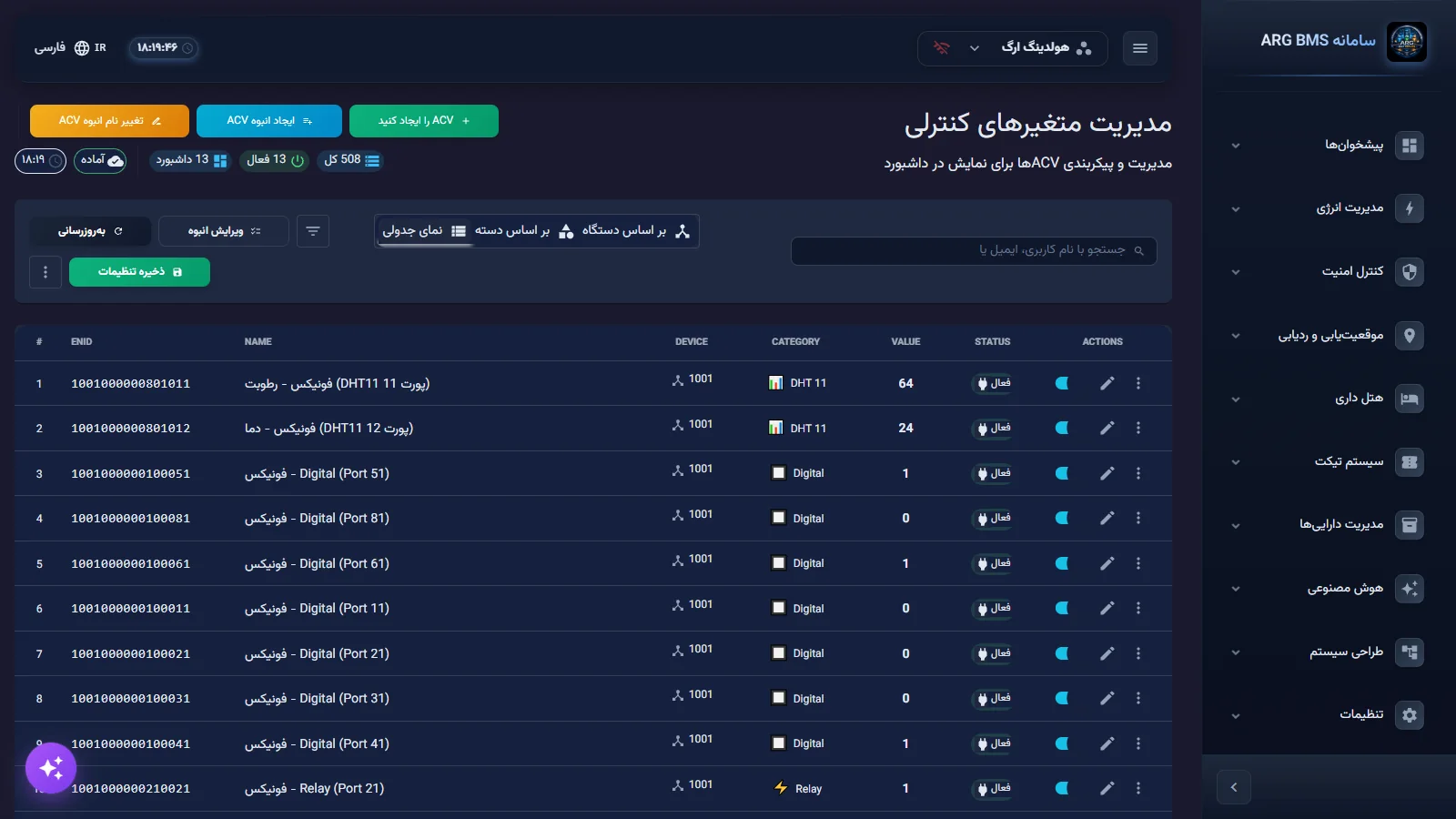
The "Control Variable Management" page opens with the subtitle "Manage and configure ACVs for dashboard display".
| Section | Purpose |
|---|---|
| Acv را ایجاد کنید (Acv (Create ACV)) | Opens the "Define New Control Variable" form |
| ایجاد انبوه Acv (Acv (Bulk Create ACV)) and تغییر نام انبوه Acv (Acv (Bulk Rename ACV)) | Group definition or naming |
| Chips | کل (Total), فعال (Active), داشبورد (Dashboard) |
| Views | بر اساس دستگاه (By Device), بر اساس دسته (By Category), نمای جدولی (Table View) |
| Table view columns | #, ENID, Name, Device, Category, Value, Status, Actions |
| Row actions | کپی ENID (ENID (Copy ENID)) and کپی مقدار (Copy Value) |
ENID structure
An ENID is exactly 16 digits, built from six parts: SSSS-BBBB-CCC-I-D-PPP. The form's default sample is 1000200003002001, shown in the preview as 1000-2000-030-0-2-001.
| Part | Digits | Meaning | Form field |
|---|---|---|---|
| SSSS | 1-4 | Device serial (1000 is the system serial) | سریال دستگاه (Device Serial) |
| BBBB | 5-8 | Base: source or protocol type | دسته بندی شناسه (ID Category) and شماره دسته بندی (Category Number) |
| CCC | 9-11 | Category code, e.g., 030 for temperature | نوع شناسه (ID Type) |
| I | 12 | 0 input, 1 output | ورودی یا خروجی (Input or Output) |
| D | 13 | 0 boolean, 1 integer, 2 decimal, 3 counter, 4 string | نوع داده (Data Type) |
| PPP | 14-16 | Port or point number, 000 to 999 | شماره پورت (Port Number) |
Common base-part (BBBB) values:
| Base | Meaning | Base | Meaning |
|---|---|---|---|
| 0-1999 | ABM device | 9004 | SNMP |
| 2000 | Variable | 9005 | Modbus |
| 2001 | Date and time | 9006 / 9007 | KNX / BACnet |
| 2002 | Timer | 9011 / 9012 | Redfish / OPC UA |
| 4000 | Person | 9024 to 9027 | S7 / FINS / MC / ADS |
| 6000-7399 | Equipment (6000 UPS, 6120 chiller) | 9030 / 9074 | MQTT / M-Bus |
| 9100 | SCADA | 9015 | EtherNet/IP |
Step by step
- Open the form. In "ACV Management", click Acv را ایجاد کنید. The "Define New Control Variable" form has a four-step wizard, a پیشنمایش (Preview) side panel, and a اعتبارسنجی (Validation) bar at the bottom. Top buttons: ذخیره پیشنویس (Save Draft), انصراف (Cancel), and ذخیره و ایجاد (Save and Create).
- Identification and ENID. In the "Basic Information" section, enter برچسب (Label) (e.g., "Room 101 Temperature"), شماره (Number), and نوع متغیر (Variable Type). Choosing the variable type automatically fills in the ENID components. In the "Identifier Components (ENID)" section, leave the device serial as the equipment's own serial and review the remaining components. The final ENID is shown in the "Unique Identifier (ENID):" box.
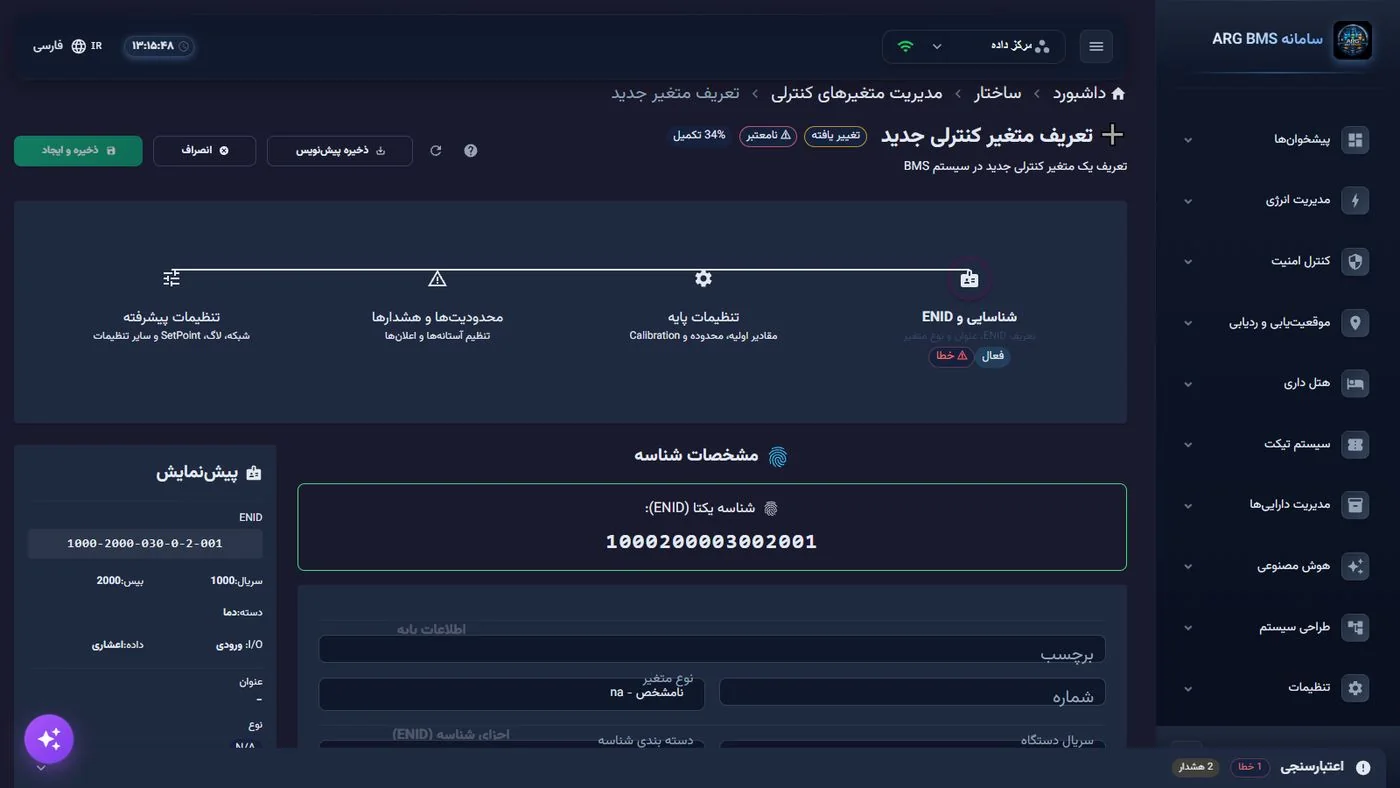
Identification and ENID · The unique-identifier box and its breakdown in the preview panel - Basic settings. In the "Formula and Values" section: فرمول ورودی (Input Formula), مقدار اولیه (Initial Value), بیشترین مقدار قابل قبول (Maximum Acceptable Value) and کمترین مقدار قابل قبول (Minimum Acceptable Value), شیب (Slope) and افست (Offset). To prevent noisy logging, set the "Change Filter" and حداقل تغییر جهت ثبت در بانک (Minimum Change to Log to Database). For control points, fill in the "SetPoint" section with the setpoint's value, maximum, and minimum.
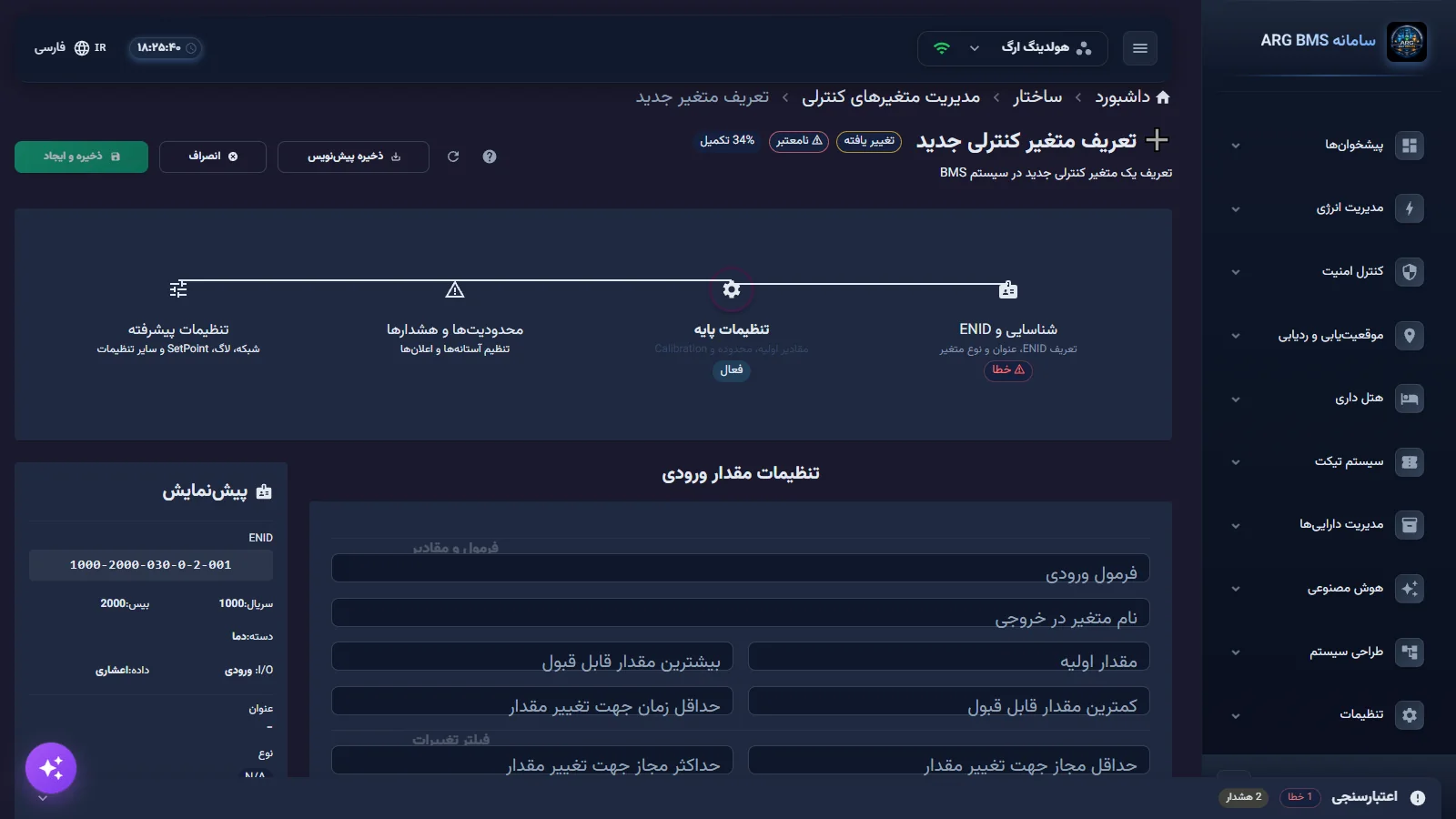
Basic settings · Input formula, acceptable range, slope, and offset - Limits and alerts. In "General Settings", set کنترل حد (Limit Control) to "yes" and choose نوع اعلام (Alert Type) ("no alert", SMS, Email, Telegram, or "all"). In "Limit Groups" there are five groups: "Normal", "High", "High-High", "Low", and "Low-Low". For each group, set مقدار حد (Limit Value), وضعیت (Status), متن اعلام (Alert Text), and, if needed, خروجی ENID (ENID (Output ENID)).
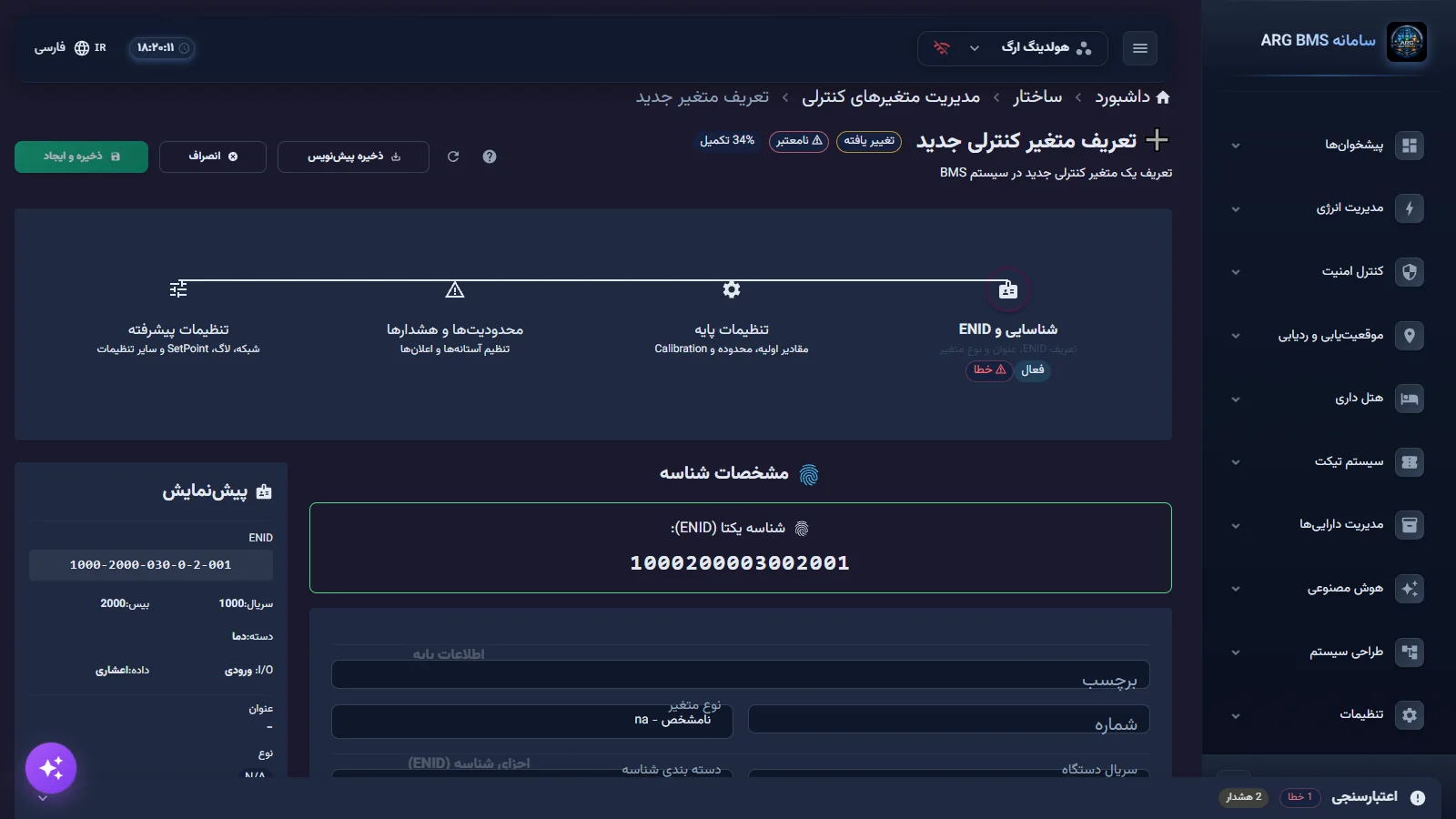
Limit groups · The five limit groups with status and alert text - Advanced settings. Configure "Network Push", "Logging", and "Web Notifications" as needed: events (high limit, low limit, change, offline), channels (browser, sound, Telegram), priority, and a "custom message" of up to 500 characters.
- Save. Click ذخیره و ایجاد. The message "Control variable created successfully" is shown; when editing, the message is "Control variable updated successfully".
The value processing chain
- The raw value is processed only when it changes; output points are always processed.
- If "Input Formula" is filled in, it is evaluated. In the formula,
xormeis the raw value,selfis the previous final value, andsetis the setpoint. A formula error sets the value to ERROR. - For the integer and decimal types: value × slope + offset. For example, a raw value of 100 with slope 0.1 and offset 2 becomes 12.
- A result outside the "minimum/maximum acceptable value" becomes ERROR; it is not clamped or truncated.
- If "Limit Control" is yes, the value is compared against the limits and the matching group's status is applied.
| Status code | Name | Form label |
|---|---|---|
| 0 | DISABLE | 0 - Off |
| 1 | NORMAL | 1 - On |
| 2 | CAUTION | 2 - Warning |
| 3 | DANGER | 3 - Danger |
| 4 | ERROR | 4 - System error |
Tips and common mistakes
- An ENID cannot be changed once built. Messages: "ENID must be exactly 16 digits" and "This ENID is already in use".
- The label must be at least 3 characters, and "Slope cannot be zero"; for no scaling, set slope to 1 and offset to 0.
- The High-High limit must be greater than the High limit, and Low-Low must be less than Low.
- The limit groups' "Status" list also shows options 5 through 7 ("maintenance", "startup", "stopped"); choose only statuses 0 through 4, since validation only accepts that range.
- The alert delay must not exceed 3600 seconds.
- Don't make the acceptable range too tight; any value outside it becomes ERROR and is shown as an error on the dashboard.
Summary
- An ENID has 16 digits: serial, base, category, input/output, data type, port.
- The base shows where the point comes from: 9004 SNMP, 9005 Modbus, 2000 variable.
- Final value = formula, then raw × slope + offset, then range and limit checks.
- Statuses are only 0 through 4: disabled, normal, caution, danger, error.
Hands-on exercise on the live demo
On the public demo, do not modify or delete any existing ACVs.
- In مدیریت ACVها (ACV (ACV Management)), go to نمای جدولی.
- Take an ENID using کپی ENID and break it into its six parts, SSSS-BBBB-CCC-I-D-PPP. Match the base against the lesson's table and say which source or protocol the point comes from.
- Open the Acv را ایجاد کنید form, set the slope to zero in "Basic settings", and see the validation message. Then click انصراف without saving.
Lesson check
Answer at least 3 of 4 correctly to pass.
- 1. How many digits does an ENID have?
- 2. In the sample ENID 1000200003002001, what does the twelfth digit (0) mean?
- 3. The raw value is 100, the slope is 0.1, and the offset is 2. What is the final value?
- 4. What happens if a value exceeds the "Maximum Acceptable Value"?