Industries, security & rollout
Where the system fits by industry, data security and isolation, cloud and on-premises deployment with measured performance, and the rollout path from needs analysis to support.
Solutions by industry
ARG ERP was not built for one particular industry, but some groups of organisations gain the most from it. For each group, the modules that are useful from day one and the problem they solve are listed below.
Manufacturers
Engineering and industrial automation firms
Contractors and construction companies
Trading and distribution
Service and support companies
Company groups and holdings
ISO 9001 certified organisations
Organisations with heavy administration
Security, access and data privacy
An organisation’s data, from employee salaries to purchase prices and contracts, must be available only to those who need it. ARG ERP builds access from role and position, keeps each organisation’s data separate from the others and encrypts all communication.
Access by role and position
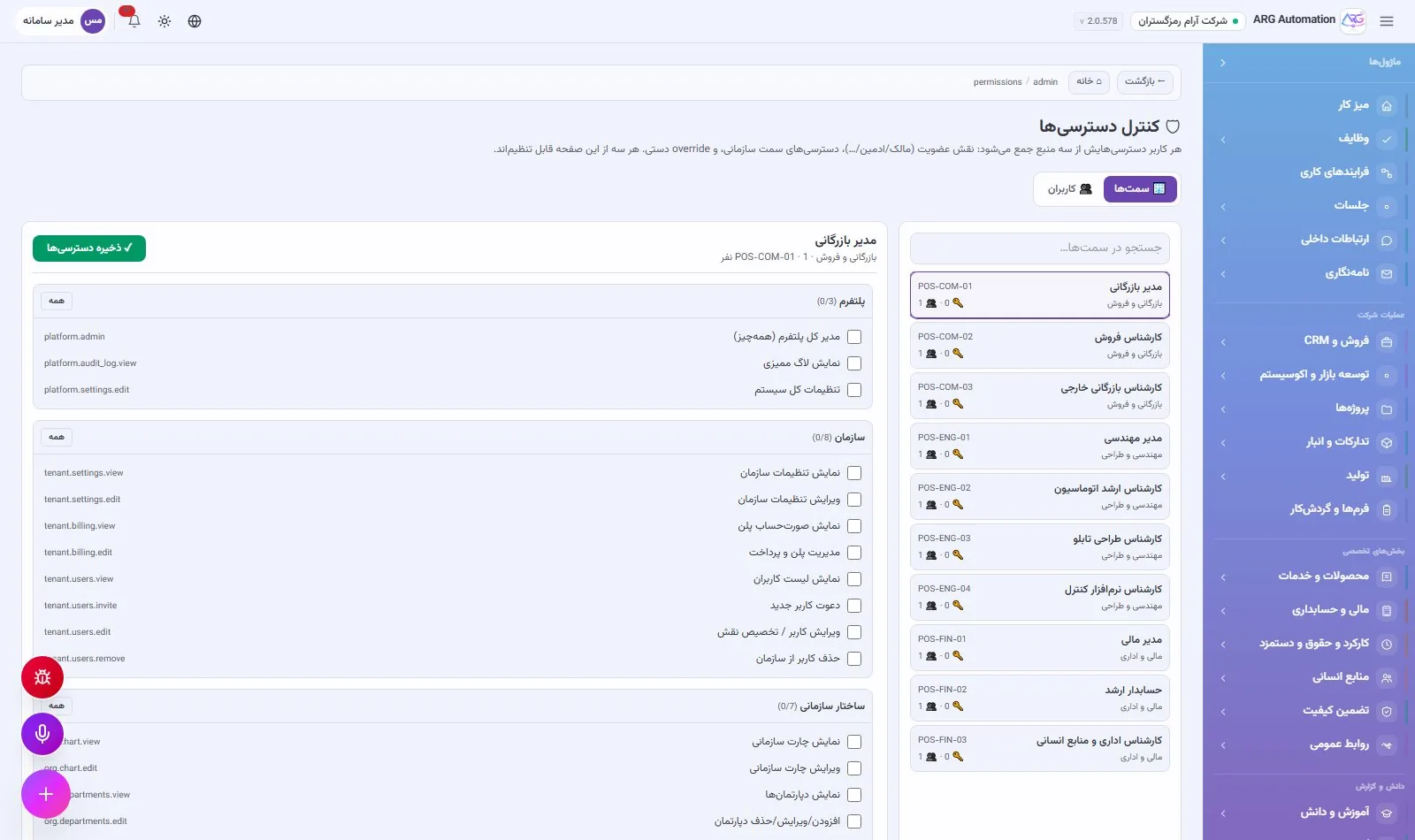
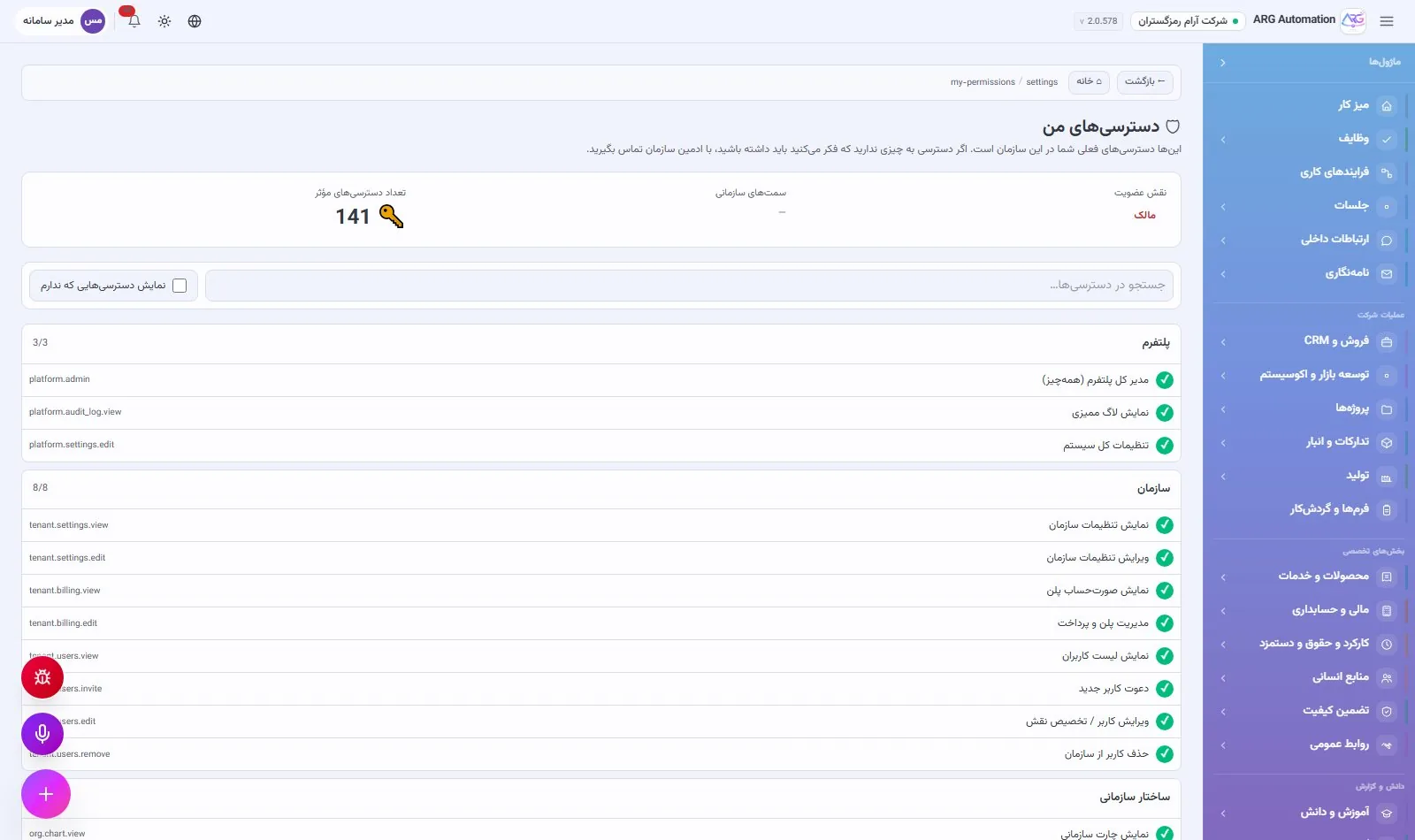
Each user in an organisation has one of five membership roles, from owner to observer, and the system does not allow the organisation’s only owner to be demoted. Beside the role, 141 fine-grained permissions are defined in 21 groups. Each person’s effective access is built from three layers: membership role, position and manual exceptions. The administrator previews the final effective access before saving, and the menu and screens are shown to each user accordingly.
Protecting user accounts
Passwords
Passwords are stored with Argon2id, today’s standard for password storage, and are never kept in readable form.
Sign-in
A failed sign-in always returns the same message and does not reveal whether an account exists.
Sessions
Sign-in tokens have a limited lifetime and each token is limited to its own purpose.
Immediate deactivation
A user who is deactivated loses access from their very next request.
Separating organisations’ data
Every business record belongs to one organisation, and the organisation of each request is taken from the user’s signed token, not from anything the browser sends. Each organisation’s attachments are also stored on a separate path, with path checks and a content fingerprint. A user who belongs to several organisations moves to another organisation only after their membership is checked.
Secure infrastructure
Encrypted connections
All traffic between browser and server is encrypted over HTTPS, and there is only one public entry point.
Safe configuration
In production the service refuses to start at all with unsafe settings, such as a default key or debug mode.
Error reports without user data
Every error has a tracking code so support can find it, but values entered by the user are not stored in error reports.
Data under the organisation’s control
In an on-premises installation all data stays on the organisation’s own server. In the cloud edition it is kept on ARG servers inside the country.
Deployment, performance and scale
ARG ERP is a web system: users need only a browser and nothing is installed on any computer. The system can run on ARG’s servers or on the organisation’s own server, and as the organisation grows its capacity increases without changing the software.
Two ways to deploy
Cloud, on ARG servers
- No server or technical team needed in the organisation
- Updates, backups and monitoring by ARG
- Suited to a quick start and to small and medium organisations
On-premises, on the organisation’s server
- All data inside the organisation’s network
- Runs on a Linux server with managed services
- Suited to organisations required to keep data on site
Measured performance
The system’s performance was measured on an ordinary server with 6 processor cores and 16 GB of memory, in its production configuration:
In the heaviest test, 50 virtual users sent requests without pause. Even then, 95 percent of responses came back in under a second and no request failed. Assuming, conservatively, one page every 10 to 20 seconds per active user, the same server supports 300 to 400 concurrent active users.
Growing with the organisation
| Step | Effect |
|---|---|
| More service processes | Capacity rises roughly in line with processor cores; just a configuration change |
| A separate database server | The service server’s resources go entirely to users |
| Several servers behind a load balancer | Horizontal scale for large organisations; the service keeps no session state in memory |
Updates and maintenance
Painless updates
Data structure changes are applied with versioned migrations, and users who have the system open are told when a new version is released.
Health monitoring
The service reports the status of its database and cache and its version number for monitoring.
Scheduled jobs
Reminders, the daily audit and correspondence follow-up run in a separate single-instance process, so no notification is sent twice.
Backups
A regular backup schedule for the database and attachments is set up during rollout.
Rollout, training and support
The success of an enterprise system depends on a proper rollout. The ARG team works with the organisation to set up its structure and processes in the system, migrates existing data, trains users and stays alongside the organisation after go-live.
1 · Needs analysis
The organisation’s departments, key processes and the modules needed from day one are identified. The organisation does not have to launch every module at once. It usually starts with sales, inventory and daily work, and other modules are added step by step. Modules that are not used stay hidden from users’ menus.
2 · Configuration
Organisation and structure
Company identity, departments and positions with job descriptions, using the ready organisation and job-description templates.
Users and access
User accounts created in bulk from staff records with temporary passwords, and access set for each position.
Finance
The organisation’s chart of accounts, fiscal year and default accounts for automatic vouchers.
Communication
The SMS gateway and its templates, company email, and workplaces for attendance.
3 · Data migration
| Data | Method |
|---|---|
| Goods and services | Bulk import from Excel or CSV with a preview before saving |
| Opening stock | Bulk receipt into each warehouse with unit cost |
| Prices | The fast pricing table with batch save |
| Employees and users | Staff migration and one-step creation of user accounts |
| Customers, suppliers, account balances | Migrated by the rollout team from the previous system’s exports |
4 · Training
Training is given by role: managers on the cockpit and reports, specialists on their own module, and all employees on the desktop, attendance, leave and forms. Because all screens follow one pattern, a user who has learned one section picks up the rest quickly. The built-in knowledge base is also ready to hold the organisation’s own guides.
5 · Go-live
Go-live starts with a pilot period on real data and is completed once the organisation signs off. The setup checklist inside the system shows what is still incomplete.
6 · Support and development
After rollout, ARG provides user support, fixes and regular updates of the system. The organisation’s new needs are reviewed in the product development plan. The system is under continuous development, and new capabilities, including connections to external software and wider process automation, will be added in future versions.
Summary
ARG ERP brings the daily work of every department onto one system and one shared dataset. Managers see the organisation live, employees work from one desktop, and virtual AI employees take on part of the repetitive work.
See ARG ERP for your organisation
Contact us for a walkthrough with sample data from your industry; existing users sign in here.