48Industries
500+Subsystems
1000+Projects
18Years
Part 8 of 12

AI & offline maps

A Persian-speaking assistant that knows the project’s data and works on the user’s behalf, the ARG AI backend for models and prediction, and the offline map server for sites without internet.
AI & offline maps
ML · RAG · LLM · AGENT

AI alongside the digital twin’s data and tools

The project-connected assistant and the independent ARG_AI backend serve complementary roles: one helps users understand the situation and work inside the software; the other provides model training, analysis, prediction and result monitoring.

Industrial AI deployment guide
ML

Learn from data and measure results

Prepare history → train models → predict and detect → evaluate and monitor

LLM + RAG + Tools

Understand the project, retrieve knowledge and act

User intent → relevant knowledge and project tools → analysis or proposed change → user confirmation

ML

Learn patterns and predict

Input
Consumption, sensor and equipment history

A model is trained on equipment data, then analyses future trends or unusual behaviour.

Output
Consumption forecasts, anomaly detection and health indicators
RAG

Retrieve project knowledge

Input
Project documents, catalogs and device templates

Knowledge retrieval finds passages relevant to the question and equipment and supplies them to the assistant.

Output
Answers grounded in documents and the project context
LLM

Explain the findings clearly

Input
User question, project data and tool results

The assistant explains findings, summarises information and uses system tools to investigate the question.

Output
Engineering dialogue, reports and reviewable recommendations
Agent

Work inside the system

Input
User intent and the current page or project context

Tools read equipment state, alarms and history; proposed creation or changes enter the user confirmation workflow.

Output
Multi-step investigation and proposed dashboards or logic

The LLM and RAG assistant: from project knowledge to system design

RAG supplies relevant knowledge, the LLM interprets the request and results, and agent tools move the work forward inside the system.

Understand equipment and project knowledge

The assistant draws on device catalogs, SNMP and Modbus templates, OIDs and uploaded project documents. RAG combines keyword and semantic retrieval to answer in the context of the relevant equipment.

Create structures, dashboards and 3D scenes

A user request can become a proposal for buildings, floors, spaces, devices and points, or for dashboard creation and cloning, 2D elements, scenes and 3D objects. System tools and user confirmation carry out the workflow.

Help design logic and scenarios

The assistant reads and checks existing logic and proposes creating or editing Rules, Limits, Scenarios, Scripts and State Machines. Command-producing logic starts disabled and requires a separate activation confirmation.

Maintain context as the work continues

Conversation history, summaries and user or project memory help continue the work. Equipment aliases, preferences and routines can be retained, pinned or forgotten.

IN THE PROJECT WORKSPACE

From an alarm question to equipment investigation

Ask the assistant to inspect active alarms, offline equipment or a point’s history. The request carries project context and tools read the required information from the system. Proposed changes are presented for user confirmation.
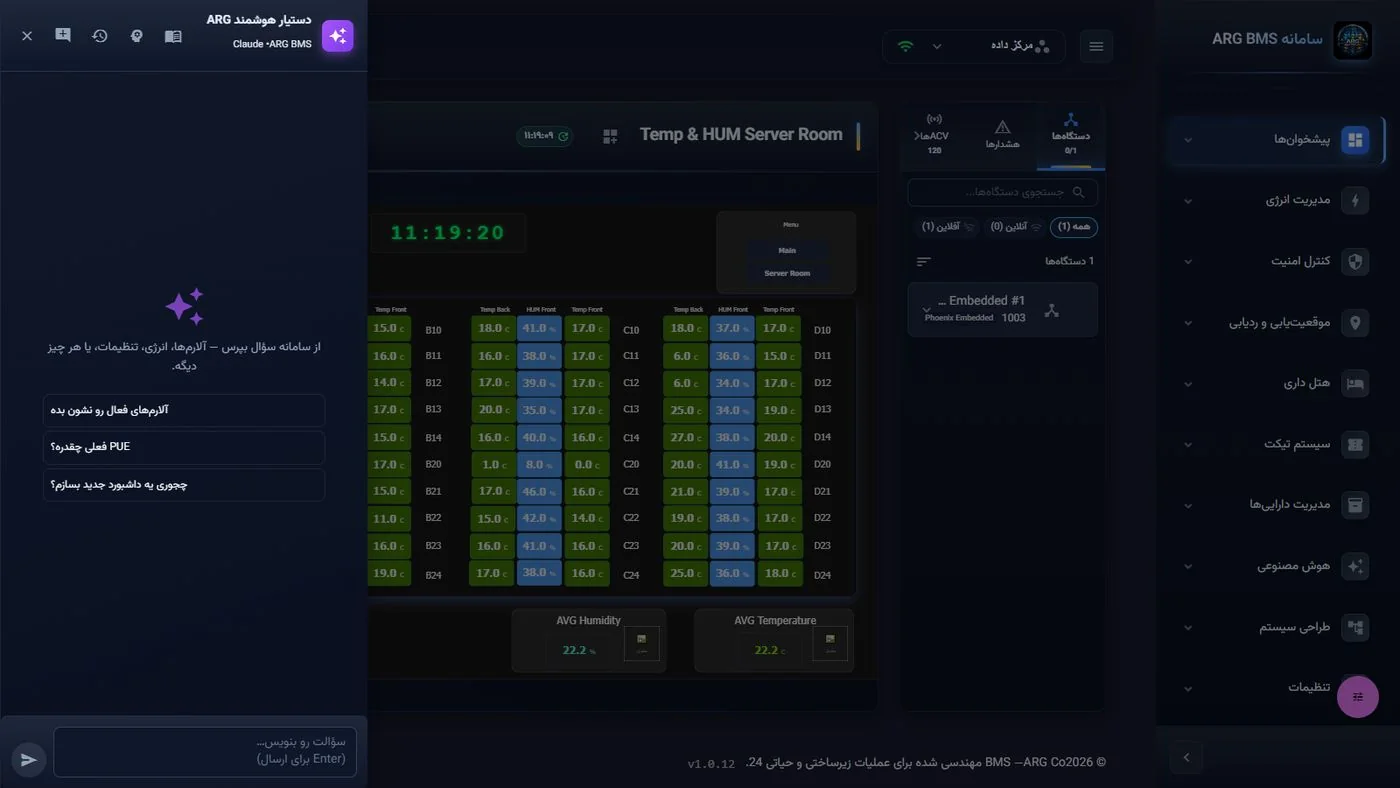
Actual assistant screen within the digital twin dashboard
System assistant screen; tool and confirmation details in the AI guide
IN THE INDEPENDENT ARG_AI BACKEND

From equipment history to a model you can evaluate

For energy forecasting, historical data trains the model; results are checked against test data and recorded with error metrics. Anomaly detection learns normal behaviour to identify observations that need investigation.
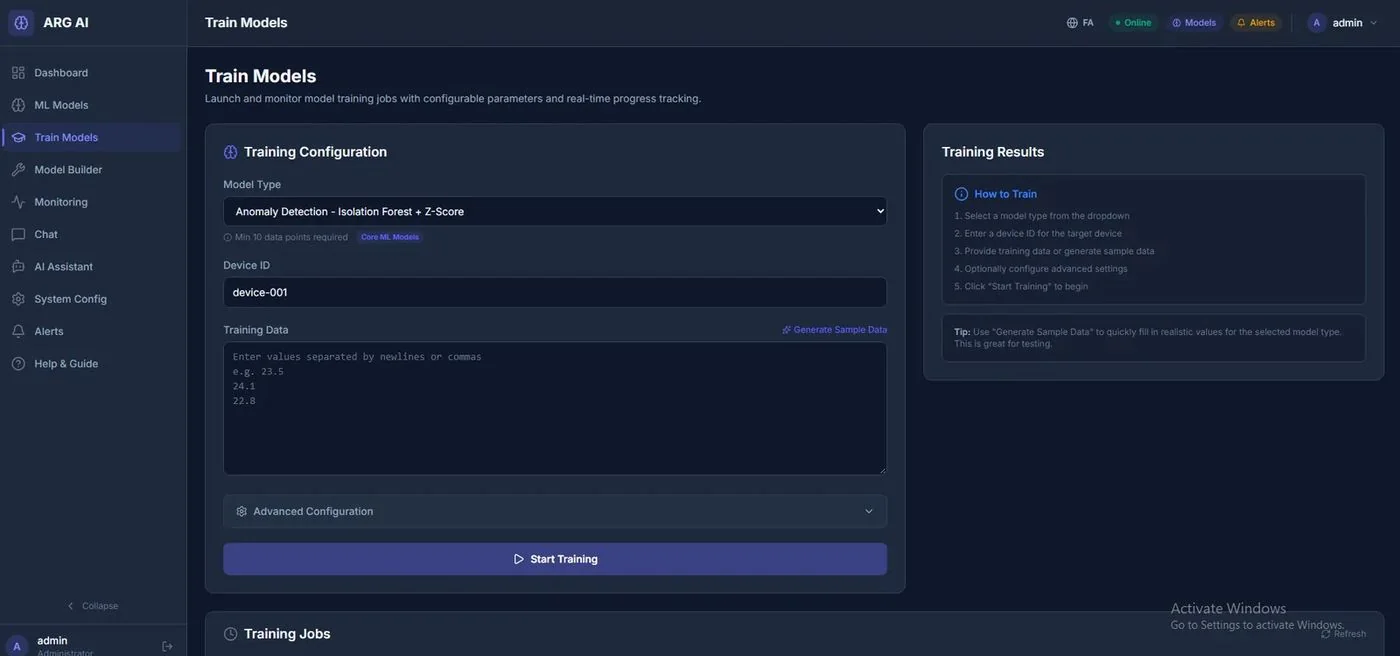
ML model training management screen in ARG AI
Model training: select the model and device, configure data and track the job

The model lifecycle: training through evaluation

  1. 1

    Prepare the data

    Equipment data becomes training features. Energy forecasting uses time windows and hour/day patterns.

  2. 2

    Train and register

    Select a model type and device; training jobs, execution state and model versions can be tracked in ML management.

  3. 3

    Evaluate and predict

    Energy forecasting separates training and test data and measures RMSE and MAE before the model is used for inference.

  4. 4

    Monitor and review

    Review model health, latency, errors and drift; operations evaluates the result alongside actual equipment conditions.

Deploy against each site’s real data

For a refinery, petrochemical plant or other infrastructure, project engineering defines data sources, equipment mapping, history quality, permitted documents and acceptance criteria. The deployment guide describes OT/DMZ integration and local LLM or provider API options. In this industrial architecture, AI informs engineers and operators while process control remains in the existing control system.

Preparation & deployment documents
13

Smart Assistant

A Persian-language assistant built on a large language model, with access to project data, that learns from the system itself and can act on the user's behalf — but never without confirmation. It is available on every page, and when the dashboard designer is open, it can see the canvas. It works with a primary language-model provider and a backup, and never accepts a tool's result from the model itself.

Figure 5 · The assistant loop. Indexed knowledge sources: the device catalog, SNMP and Modbus templates, common OIDs, the knowledge folder, and documents uploaded per project. Each row's vector embedding is stored so that switching models allows re-indexing.

Query and Diagnosis (41 tools)

  • Project summary, equipment, points and instantaneous values, active alarms, and alarm statistics
  • Detection of offline equipment, stale points, and anomalies; equipment health; overdue maintenance
  • History of a point, energy consumption, meters, tickets, events, notifications
  • Search across structure, dashboards, people and roles, and assets; reading and testing rules, limits, scenarios, scripts, and state machines; search of the knowledge base

Taking Action (44 tools, with a confirmation card)

  • Creating a full structure, organization, building, floor, space, floor duplication, equipment (single or bulk), and points
  • Creating/cloning/deleting dashboards, adding or designing 2D elements for a space, creating 3D scenes and objects
  • Creating and editing rules, limits, scenarios, scripts, and state machines; enable/disable, execute, send event, reset; creating and assigning roles
  • Every suggestion becomes a card, confirmable within 30 minutes; command-issuing logic is created "disabled" and needs a second confirmation to activate; writing to a point that is itself a condition is refused

Memory

Conversations are kept on the server and compressed into a rolling summary; the assistant remembers facts, aliases, preferences, and routines for the user or project (pinning, forgetting).

Knowledge Base (RAG)

The device catalog, SNMP/Modbus templates, common OIDs, the knowledge folder, and documents uploaded per project are indexed into 1,200-character chunks; hybrid keyword + semantic-vector search, with answers still available even when the vector service is unreachable.

Assistant on a live dashboard
Assistant on a live dashboard · starter suggestions ("Show active alarms", "What's the seasonal PUE?", "How do I create a new dashboard?") and the chat / history / memory / knowledge bar
14

ARG AI Backend

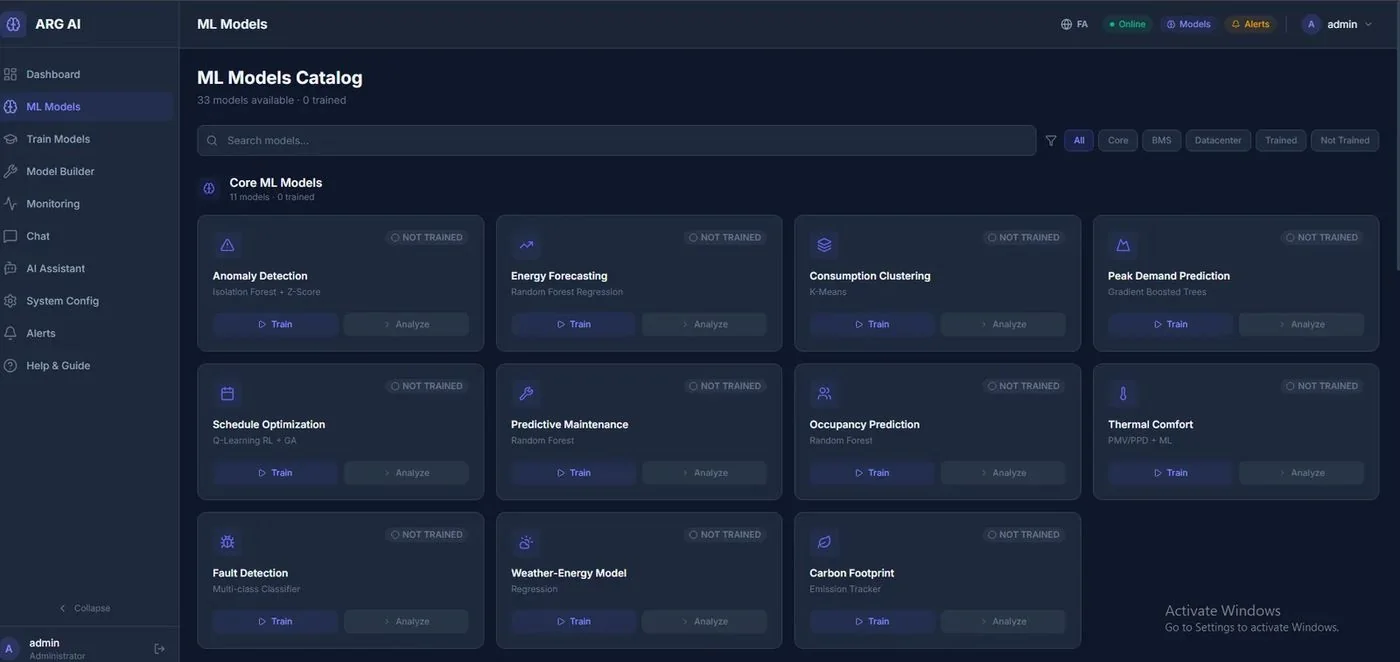
An independent machine-learning and analytics service for buildings and data centers that ingests twin data and produces forecasts, detection, optimization, and intelligent reports. It works with multiple language-model providers and can run entirely locally (offline, with a local language model). A full API with 145 documented operations.

33ready-made machine-learning models
145documented API operations
3compliance frameworks: ISO 27001 · SOC 2 · ASHRAE
LSTM · DQNdeep models via the Python service

Analytical Models

DomainModels and Outputs
EnergyConsumption forecasting (Random Forest, LSTM), demand-peak forecasting and load shifting, demand response (tariff analysis, load scheduling, cost optimization), consumption-pattern clustering (K-Means) and classification of new patterns, weather-energy model and pre-cooling/pre-heating driven by weather forecasts, carbon footprint
Detection and DiagnosticsSingle-sensor anomaly detection (Isolation Forest + Z-Score) and multivariate (cross-sensor correlation), fault detection and diagnosis (multi-class), predictive maintenance (failure forecasting), equipment health curve and remaining useful life, data-drift monitoring
Comfort and OperationOccupancy prediction for HVAC/lighting, thermal comfort (PMV/PPD), equipment schedule optimization (Q-Learning reinforcement learning + genetic algorithms, DQN), integrated cost/comfort optimization across systems
Building SystemsLighting management (daylight, occupancy, circadian rhythm), elevators (traffic prediction, wait time), water (leaks, consumption forecasting, pressure anomalies), fire safety (risk, smoke/CO₂ patterns), access control (entry/exit patterns, intrusion detection)

Training and Execution

  • Training each model on a device's data; synchronous and asynchronous training jobs with status tracking and cancellation
  • Parallel batch analysis, prediction cache with hit statistics, rate limiting per category
  • Model health and automatic retraining; per-model prediction metrics and a monitoring dashboard
  • Data import from CSV/JSON/bulk records with import history; sensor-data simulation for testing

Intelligent Services

  • Chat assistant with multiple providers (automatic selection, connection testing, rate and buffer management), streaming responses, sessions
  • AI-generated intelligent reports with PDF/Excel export; prompt templates with variables
  • Alarm engine with rules, acknowledgment, and history; rule-based auto-remediation with an execution log; webhooks
  • Multi-site support with a per-site dashboard and health overview; subsystem health map; BMS and data-center dashboards
  • Digital twin simulation and "what-if" analysis; ISO 27001 / SOC 2 / ASHRAE compliance checks with history
  • Mobile API (quick status, health summary, alarm feed, quick analysis); JWT token authentication
Model catalog
Model catalog · 33 models with base/BMS/data-center filters and training status
Model training
Model training · model type, target device, training data, advanced configuration, and job queue
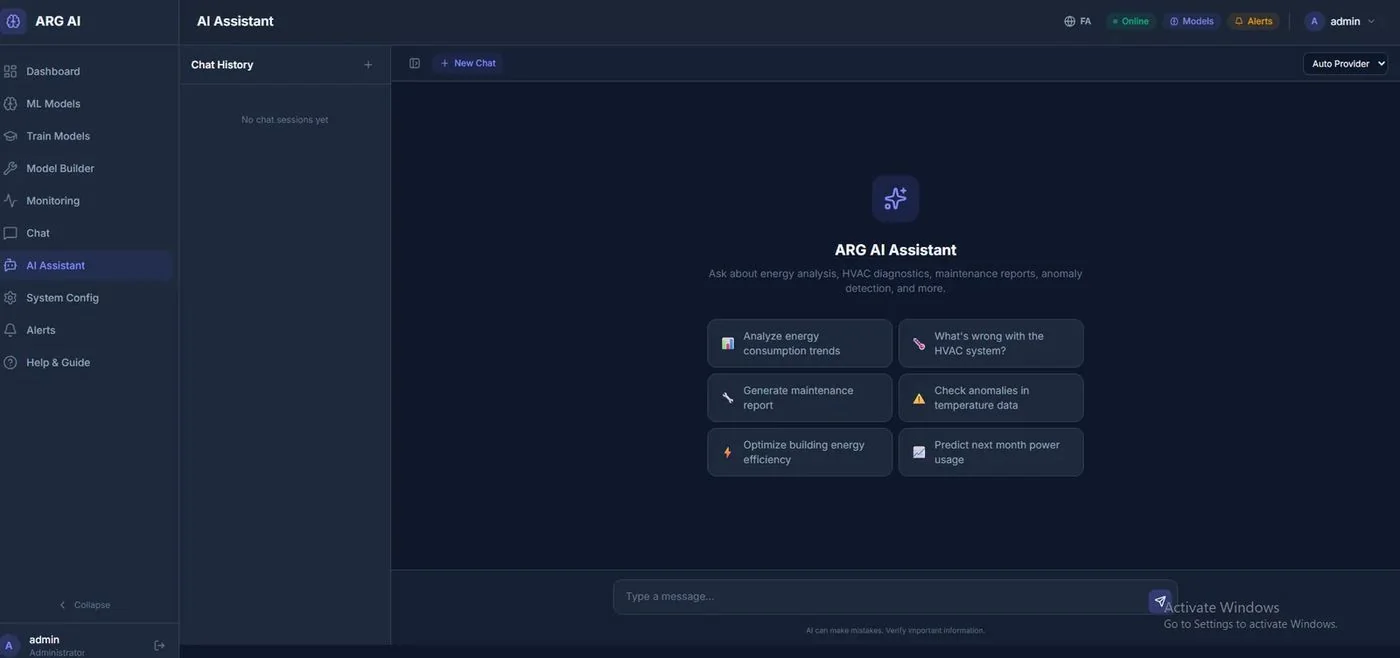
ARG AI assistant
ARG AI assistant · consumption analysis, HVAC diagnostics, maintenance reports, temperature anomalies, consumption forecasting
15

ARG Offline Map Server

Many industrial, military, and infrastructure sites have no internet access, or must not have any. The ARG Offline Map server keeps map tiles inside the customer's network and serves the system's map dashboards, site views, asset tracking, and fleet tracking — with no external dependency.
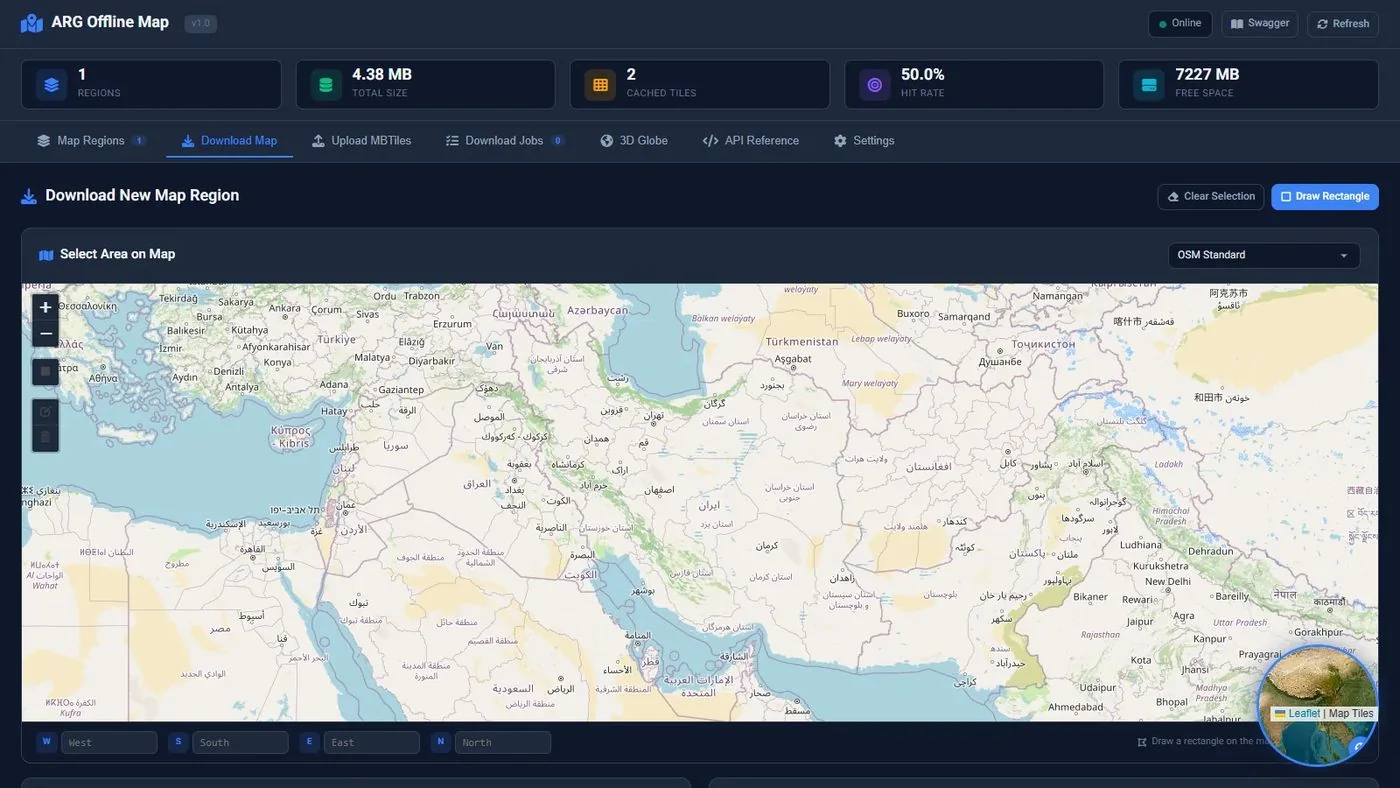
Capabilities

  • Map region management: defining a region by selecting an area on the map or from presets (country, province, city)
  • Downloading tiles for a region and zoom range with a tile-count estimate; download jobs that can be tracked and canceled
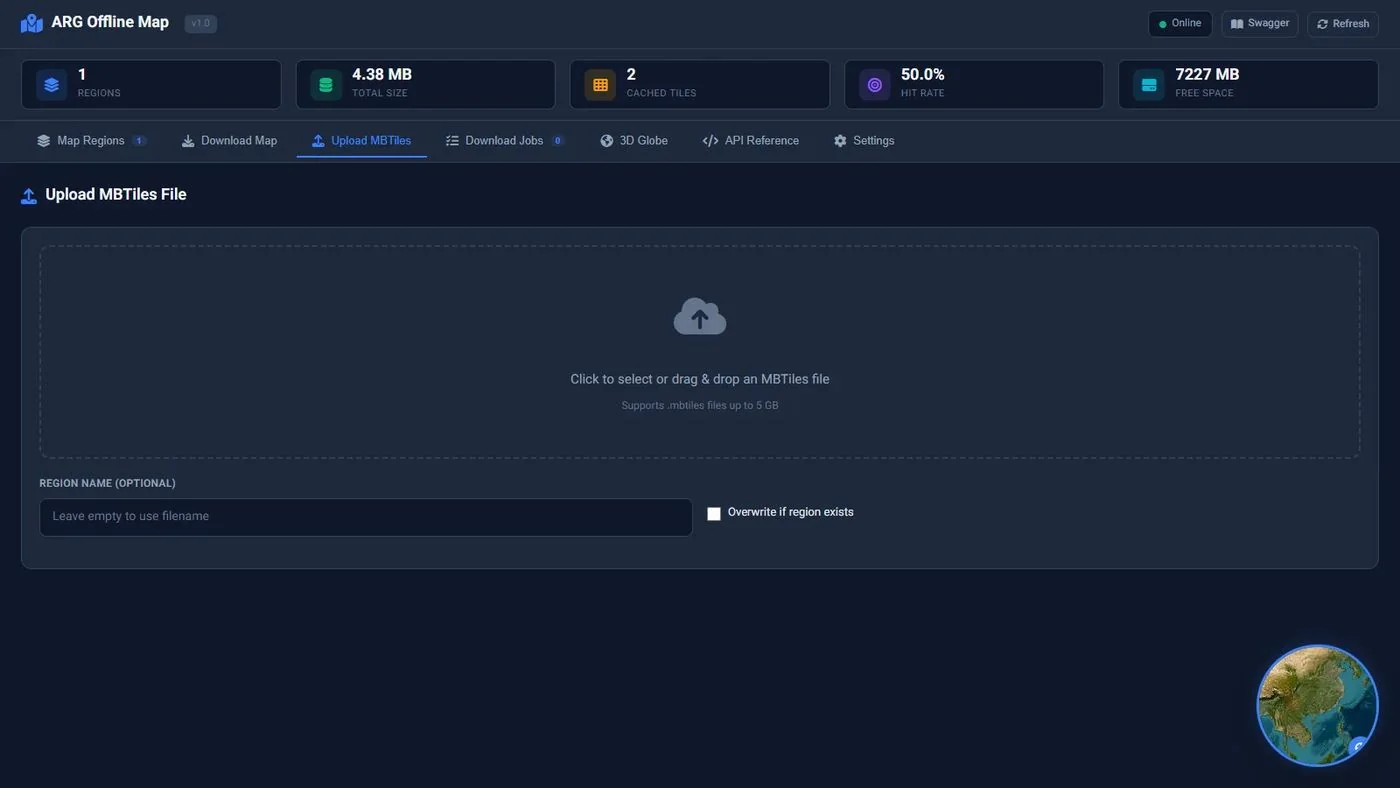
  • Uploading ready-made MBTiles packages; displaying the geographic bounds and details of each region
  • Standard tile serving (z/x/y) compatible with Leaflet and MapLibre; OSM, dark, and satellite base layers
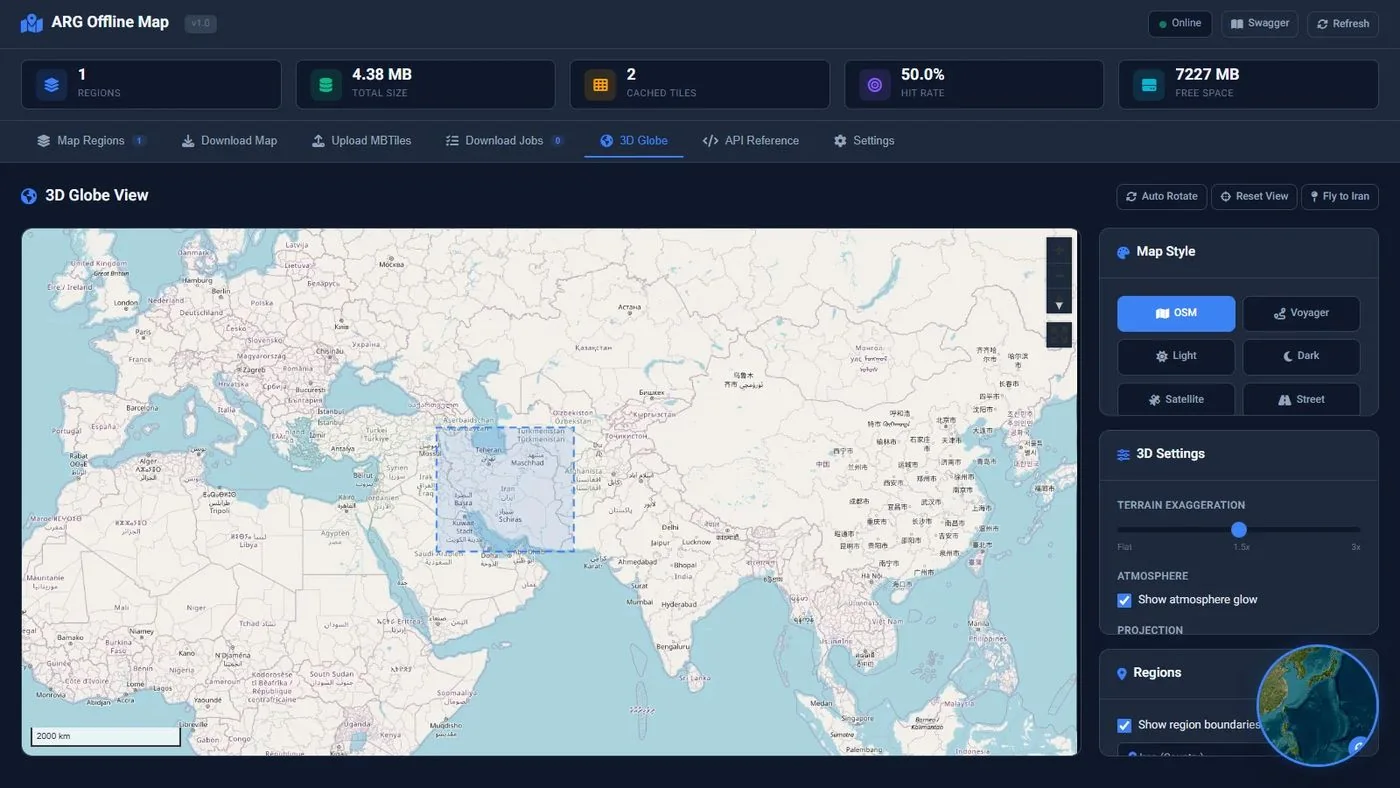
  • 3D globe view with terrain relief, atmosphere, and region boundaries; table and map views of regions
  • Cache with hit-rate statistics, storage and free-space statistics, cache clearing, and health checks
  • Documented API (18 operations: regions, downloads, tile service) with sample connection code from Leaflet

Integration with the System

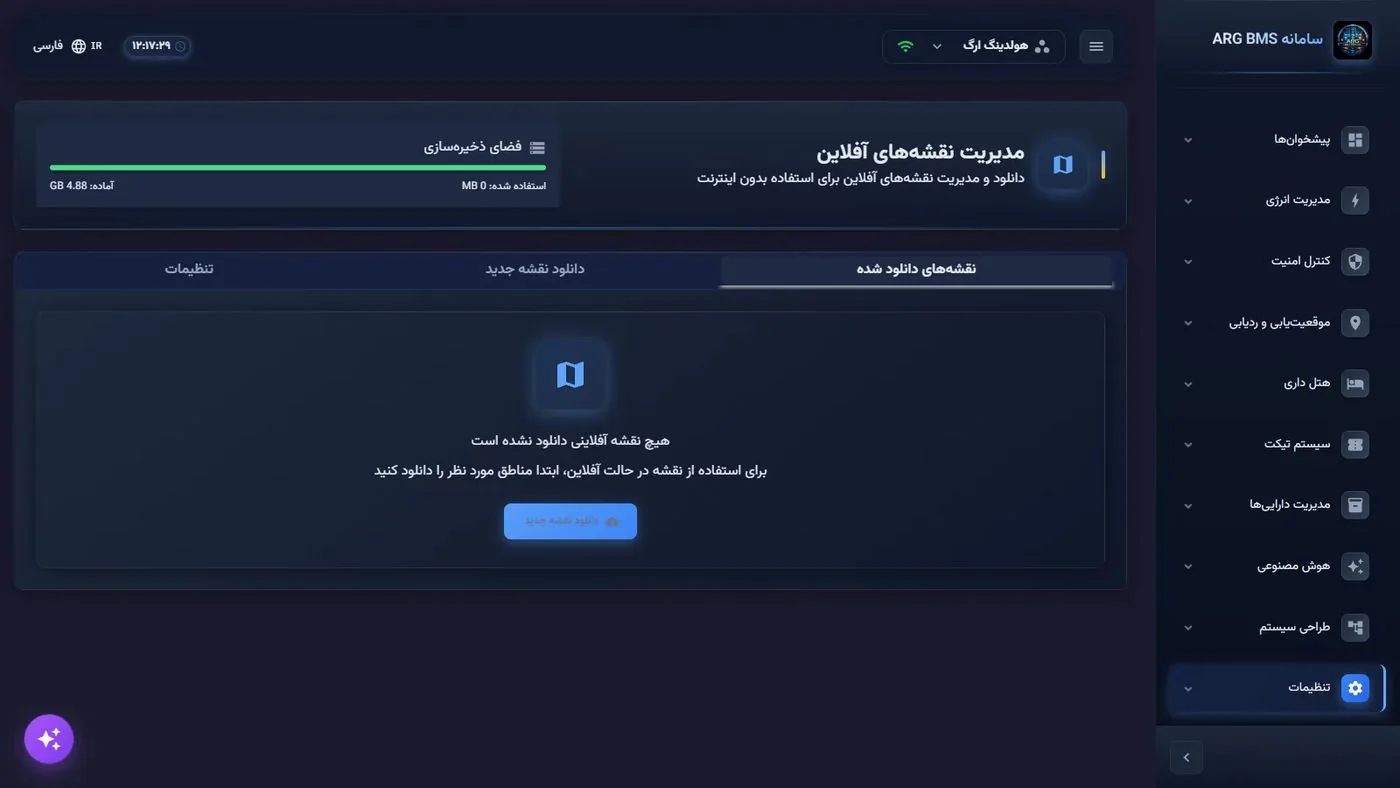
  • The offline map server's address is entered in the system settings, and maps are automatically fed from it
  • 8 tile sources for online mode (OSM, Carto light/dark, satellite, topographic...) and an "offline" source for closed networks
  • "Map"-type dashboards, MiniMap, drawing tools, and marking of equipment and sites on the map
  • Suited to data centers, power substations, geographically dispersed sites, and fleets
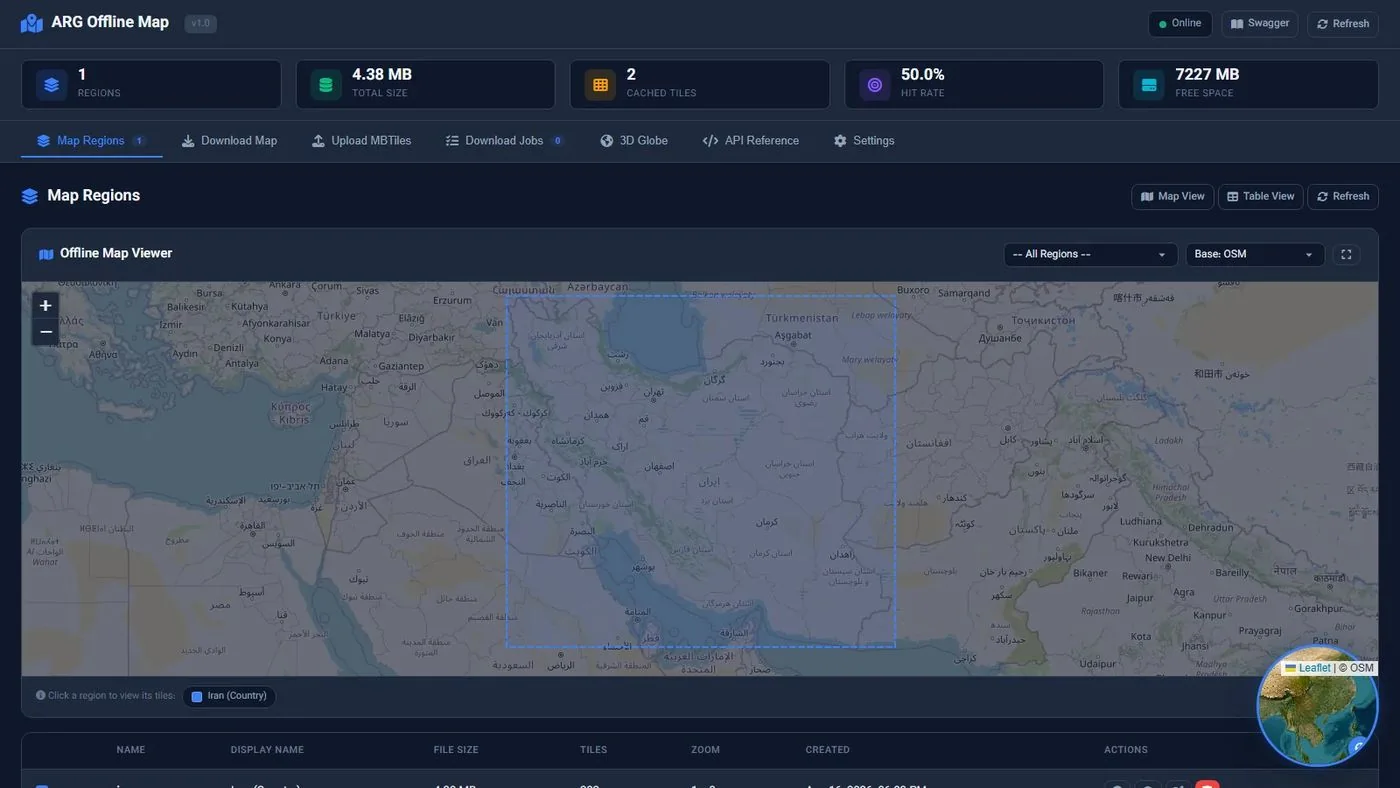
Main view
Main view · regions, total volume, cached tiles, hit rate, and free space; offline map viewer with base layers
Downloading a new region
Downloading a new region · selecting the area on the map, zoom range, and estimate
3D globe view
3D globe view · map style, terrain relief, atmosphere, and region boundaries
Uploading MBTiles
Uploading MBTiles · drag and drop the tile package
Offline map settings in the system
Offline map settings in the system · connecting to the map server

See the Digital Twin live

The live ArgBMS demo with real 3D twins, dashboards and logic.