Scripts, state machines, scenarios, and the test lab
Tell apart the logic engine's three execution mechanisms, build a scheduled script, a state machine, and a scenario, and, before relying on them, check the logic in the test lab against simulated data.
«طراحی سیستم» ← «طراحی منطقی» ← «موتور قوانین و اتوماسیون» ← زبانههای «اسکریپتها»، «سناریوها»، «ماشینهای حالت» و «آزمایشگاه تست» — «طراحی سیستم» ← «طراحی منطقی» ← «موتور قوانین و اتوماسیون» ← زبانههای «اسکریپتها»، «سناریوها»، «ماشینهای حالت» و «آزمایشگاه تست» — System Design → Logic Design → Rules and Automation Engine → the Scripts, Scenarios, State Machines, and Test Lab tabs
A rule is built for "if this, then that". But real operational tasks usually have a sequence (turn on the pump, wait thirty seconds, open the valve), or a state (a chiller: off, charging, running, maintenance), or are a reversible bundle (a building shutdown state and restoring it). For these three, the system has three separate mechanisms: script, state machine, and scenario. And so that none of them runs blindly against real equipment, a "test lab" exists.
Which mechanism for which job
| Mechanism | Core problem | Example |
|---|---|---|
| Automation script | A sequence of steps with delay, condition, and loop | Sequential plant-room startup, a weekly report |
| State machine | A process where "where it is right now" matters | A chiller's lifecycle, UPS states, an elevator |
| Scenario | An action bundle that is activated and later reverted | An emergency-evacuation state, a building sleep state |
All three tabs share the same layout: a جستوجو… (… (Search…)) box, a بارگذاری مجدد (Reload) button, a green مورد جدید (New Item) button, and cards that have a name, description, an enabled/disabled toggle, an ID chip, and edit/delete buttons. Each card's main button differs: اجرا (Run) for a script (which turns into توقف (Stop) while running), فعالسازی (Activate)/غیرفعالسازی (Deactivation) for a scenario, and Reset for a state machine.
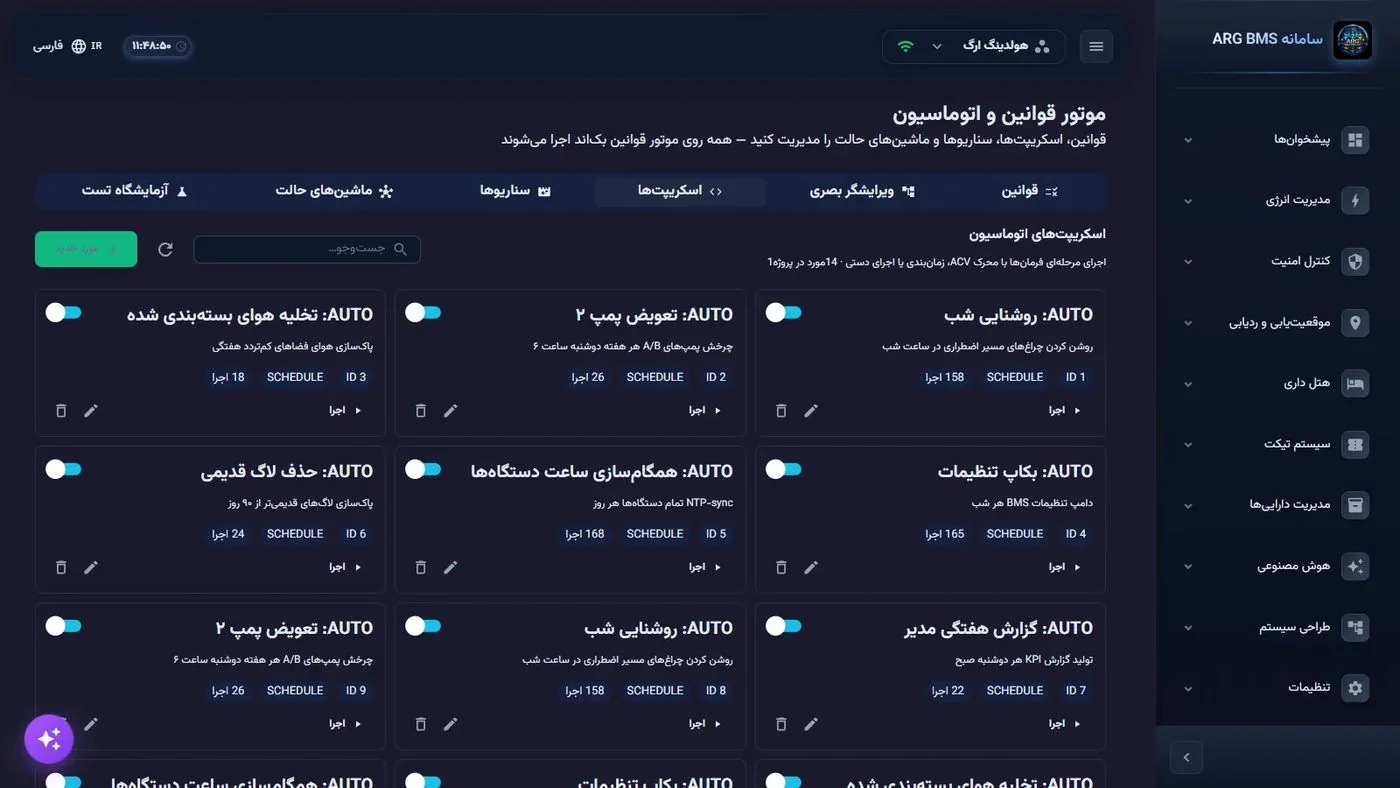
Automation script
The script-creation window has these fields: نام (Name), توضیحات (Description), نوع محرک (Trigger Type) (MANUAL, ACV_CHANGE, ACV_CONDITION, SCHEDULE, RULE_FIRED), ENID محرک (ENID (Trigger ENID)), شرط محرک (Trigger Condition), Cron, مراحل اجرا (JSON) ((JSON) (Execution Steps)), and Action هنگام خطا (JSON) (Action (JSON) (Action on Error)).
You write the steps as JSON. The types the engine executes:
| Step type | Fields | What it does |
|---|---|---|
SET_VALUE | targetEnid and value or expression | Writes a value to a point |
DELAY | delayMs | Pauses between two steps |
CONDITION | condition, thenSteps, elseSteps | A conditional branch |
LOOP | loopType, count, condition, maxIterations, bodySteps | Repeats steps |
NOTIFICATION | channel, message, subject, recipients | Sends an SMS or email |
PARALLEL | steps | Runs several steps at once |
In a notification step's message text, you can insert a point's instantaneous value with the format ${ACV['enid']}.
State machine
The state-machine window has these fields: نام, توضیحات, ENID هدف (ENID (Target ENID)) (the point that drives the machine), شناسه State اولیه (State (Initial State ID)), Stateها (JSON) (State (JSON) (States)), Transitionها (JSON) (Transition (JSON) (Transitions)), and فراداده (JSON) ((JSON) (Metadata)). Each state has an id and a name, and can have isInitial, isFinal, timeoutMs, timeoutTargetStateId, and entry/exit actions. Each transition is identified by fromStateId and toStateId, and can have a trigger point, a condition, a guard, an event name, and a priority.
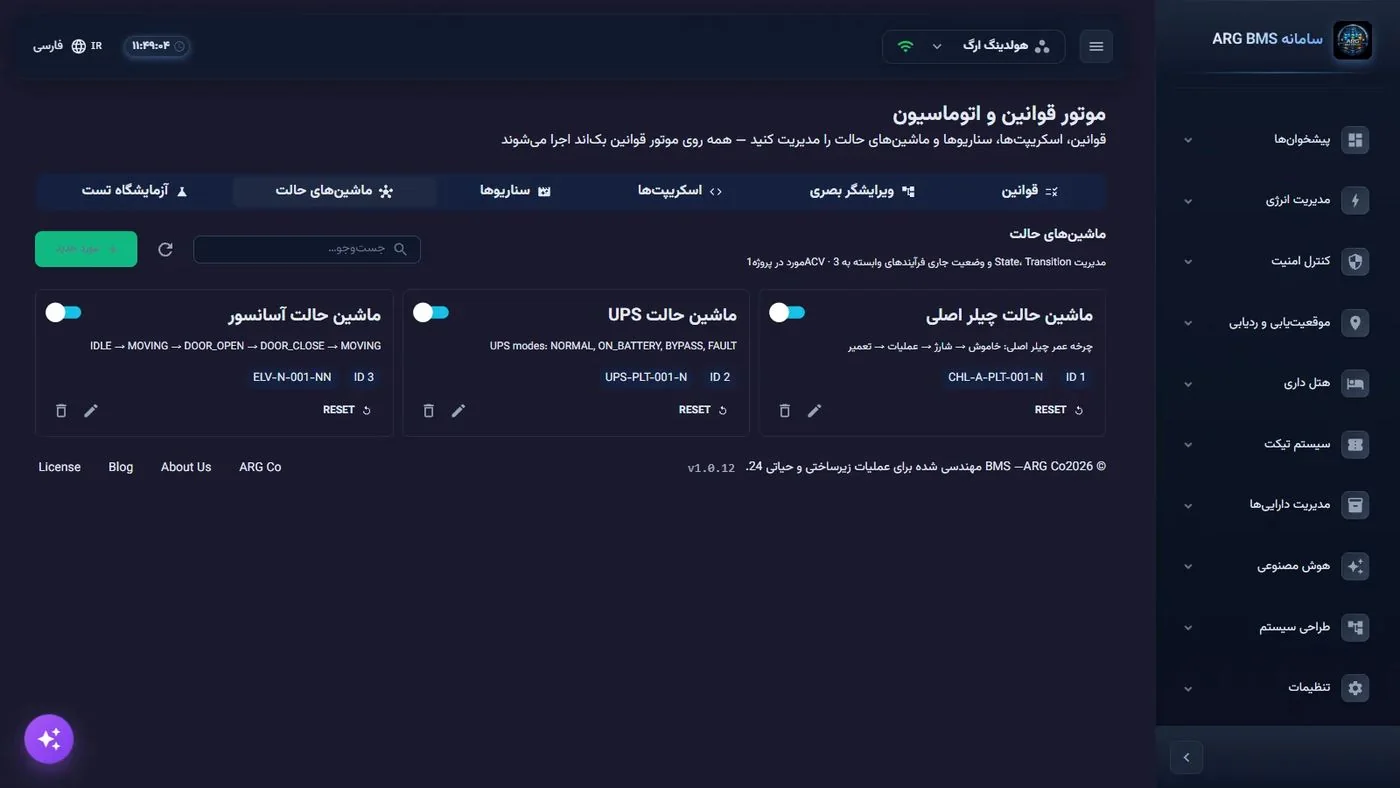
Scenario
The scenario window has these fields: نام, توضیحات, نوع فعالسازی (Activation Type) (MANUAL, RULE, EXPRESSION, SCHEDULE), عبارت فعالسازی (Activation Expression), شرط غیرفعالسازی (Deactivation Condition), زمان وقفه (Timeout) in minutes, شناسه قوانین مرتبط (Related Rule IDs), Actionهای فعالسازی (JSON) (Action (JSON) (Activation Actions)), and Actionهای غیرفعالسازی (JSON) (Action (JSON) (Deactivation Actions)). Actions are usually written as [{"targetEnid":"…","value":"1","delayMs":0}], and the deactivation list is usually the reverse of the activation list.
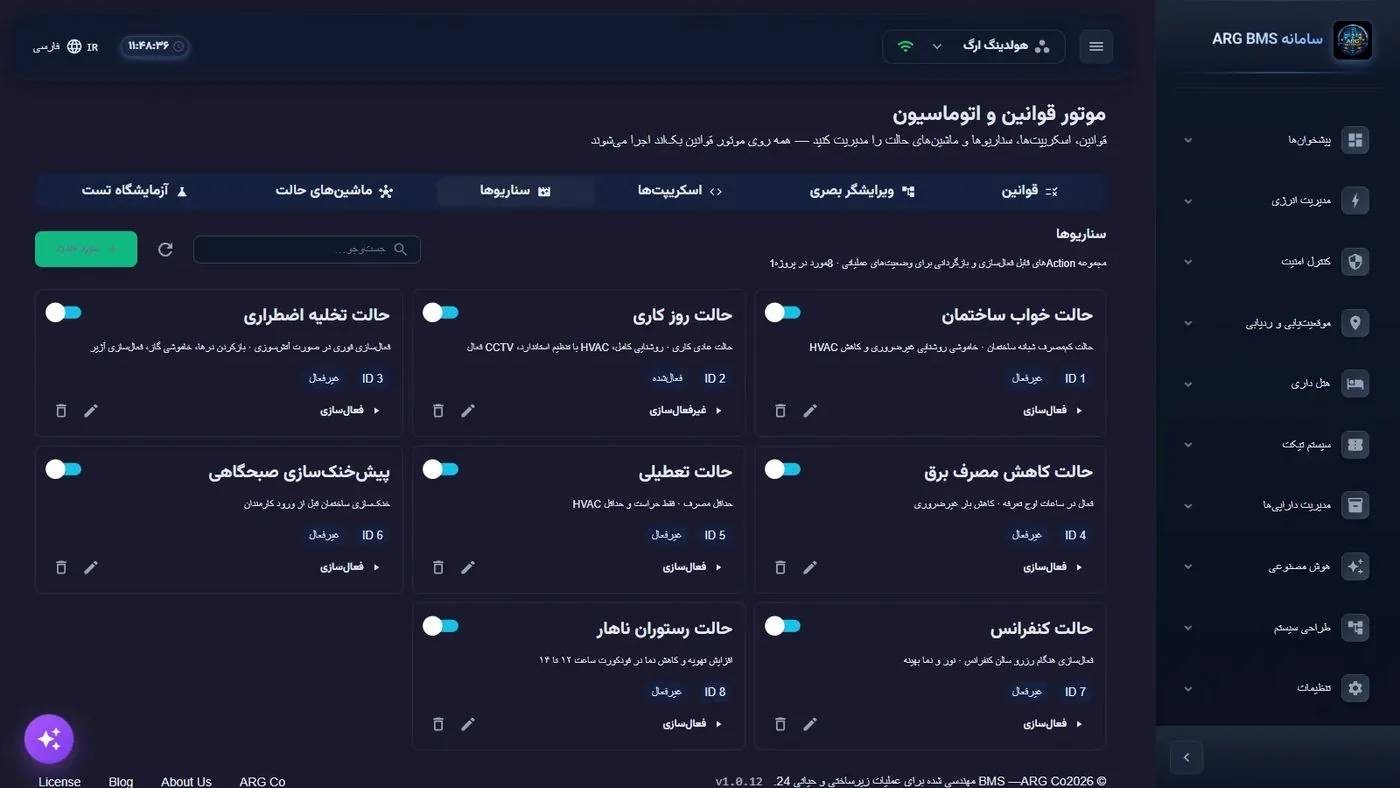
Step by step
- Build a scheduled script. اسکریپتها (Scripts) tab ← مورد جدید. Write the name (leaving it empty gives you the message "Name is required."), set نوع محرک to SCHEDULE, and in Cron write, for example,
0 0 6 * * *. For an ACV_CONDITION trigger, instead of Cron, fill in ENID محرک and شرط محرک (likeACV['<ENID>'] > 30). - Write the steps and save. In مراحل اجرا (JSON), enter the list of steps. Invalid JSON is not saved, and the message "Invalid JSON structure: …" appears. After ذخیره (Save), you see the message "Saved".
- Run a manual execution knowingly. The اجرا button on the card shows a confirmation prompt: "Run script "…"? Its Actions may affect the system." After confirming, the message "Run started · ID n" appears, and the button turns into توقف. This run is real, not a test.
- Define the state machine. ماشینهای حالت (State Machines) tab ← مورد جدید. Set ENID هدف, write the states in Stateها (JSON) and the transitions in Transitionها (JSON). An incomplete definition is not saved, and you get the error "Invalid state machine: …" — for example, when no initial state is defined or a transition points to an unknown state.
- Build the scenario and also write its reversal. سناریوها (Scenarios) tab ← مورد جدید. Choose نوع فعالسازی (for EXPRESSION, an expression like
ACV['<smoke detector>'] == 1), fill in both Action lists, and set شرط غیرفعالسازی or زمان وقفه if needed. If the engine cannot execute part of the definition, on save you get a yellow warning, "Saved, but the engine will not run it: …" — take this warning seriously. - Sync the simulator. «طراحی سیستم» ← «شبیهساز دستگاهها» (« » ← « » (System Design → Device Simulator)) and the همگامسازی پروژه (Sync Project) button. Without this, the test lab has no data for your project.
- Evaluate it in the test lab. Go back to the آزمایشگاه تست (Test Lab) tab and click بازآوری (Refresh); the وضعیت Snapshot (Snapshot (Snapshot Status)) tile should become "ready". Select the rule you want from the قانون پروژه (Project Rule) list and click تنظیم و ارزیابی (Configure and Evaluate) to open the safe test window.
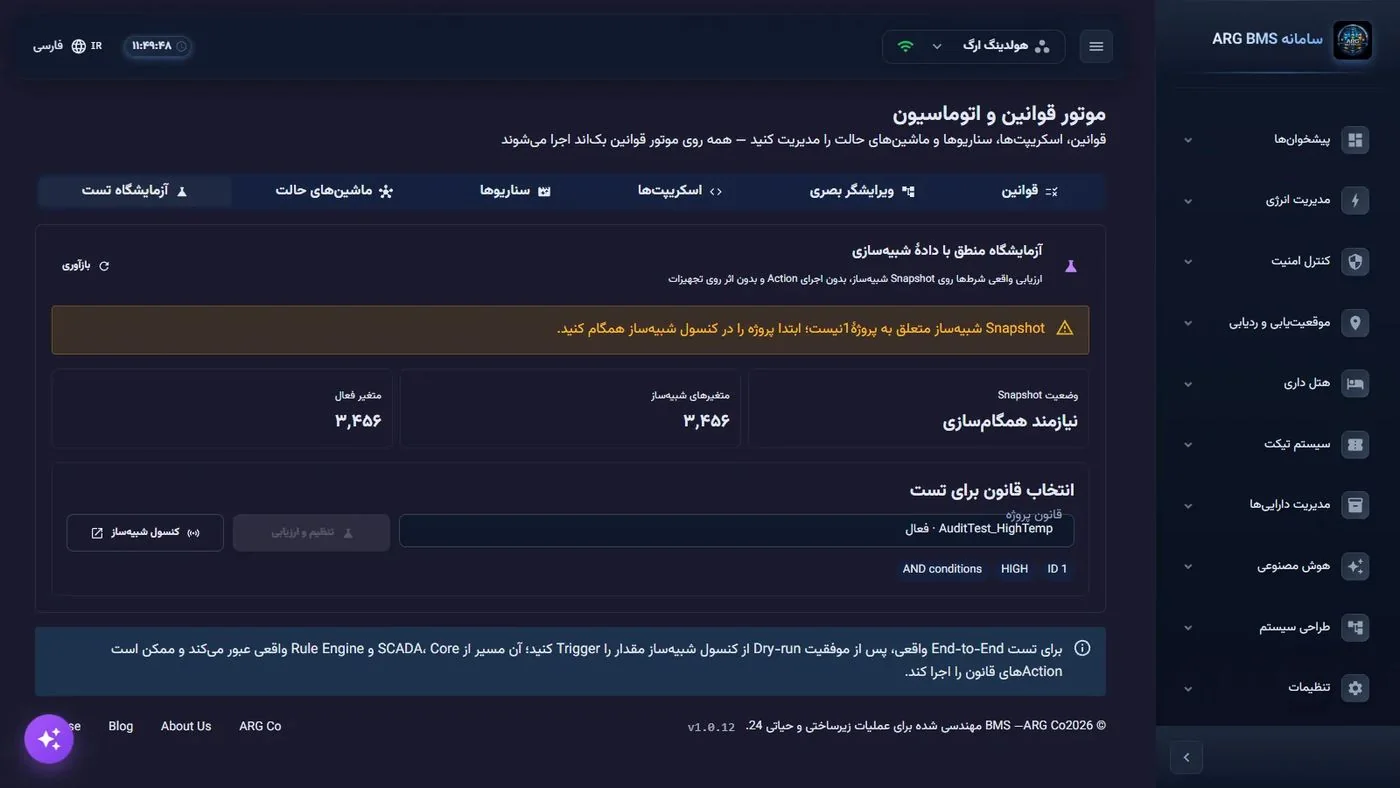
Test Lab · The "Snapshot Status" tile, the variable count, and rule selection for evaluation; a banner at the top says the snapshot must be synced with the project
Tips and common mistakes
- In every expression, write a point as
ACV['ENID']; an expression that names no point is never evaluated. - The engine only executes the SET_VALUE, DELAY, CONDITION, LOOP, NOTIFICATION, and PARALLEL step types; other types are silently ignored. If a step has no effect, check its type first.
- Action هنگام خطا (JSON) is saved but is not executed in the current version; build error-safe behavior with a
CONDITIONstep inside the sequence itself. - The toggle on a scenario's card means "is the definition active or not", while the فعالسازی button means "run it right now". Don't confuse the two; an inactive scenario runs neither by trigger nor manually.
- In a scenario, a زمان وقفه of 0 means no time limit; the scenario stays active until manual deactivation or until the deactivation condition is met.
INTERVAL:below 1000 milliseconds is not accepted, and all times are server time.- A state machine continues from whatever state it's stuck in; after changing the definition, use Reset to return it to its initial state.
- A safe test executes no action, but an actual change of a value from the simulator console goes through the full path and can trigger rules' actions. Keep these two separate.
Summary
- Sequence → script, state → state machine, reversible bundle → scenario.
- Steps and definitions are JSON; an invalid structure is not saved, and the warning "the engine will not run it" means the definition was saved but has no effect.
- An EXPRESSION scenario is activated only at the moment its condition becomes true, not for as long as the condition holds.
- A script's manual run and a scenario's activation are real; the test lab is a safe place to practice.
- The test lab does not work without a simulator project sync.
Hands-on exercise on the live demo
Work on the public demo (هولدینگ ارگ (ARG Holding)). The اجرا, فعالسازی, and Reset buttons are real executions; do not click them in this exercise, and do not delete anything.
- On the اسکریپتها tab, open a SCHEDULE script for editing using the edit icon. From its Cron and مراحل اجرا (JSON), write down when and exactly what this script does, then click انصراف (Cancel).
- In ماشینهای حالت, open the chiller or UPS state machine and, from its JSON, sketch the states-and-transitions diagram on paper and mark the initial state.
- In سناریوها, open a scenario and compare its activation and deactivation Action lists: does the deactivation revert every change?
- Open the آزمایشگاه تست tab and note the وضعیت Snapshot tile's state. If it was "Needs sync", explain what step is required to get it ready.
Lesson check
Answer at least 3 of 4 correctly to pass.
- 1. A scenario has activation type EXPRESSION and the expression ACV['X'] == 1, while X has been 1 for a long time. When does it activate?
- 2. Which step type in a script's "Execution Steps (JSON)" is not executed?
- 3. What happens when you save a state machine whose transition points to an unknown state?
- 4. The "Snapshot Status" tile in the test lab shows "Needs sync". What should be done first?