Assets, maintenance and tickets
Get to know the “Asset management” and “Ticketing system” pages: what each card counts, what the statuses and priorities mean, and which page, in the current version, actually produces an export.
«مدیریت داراییها» ← «فهرست داراییها» / «برنامه نگهداری» / «مدیریت هزینه دارایی» / «اسناد و گارانتی» و «سیستم تیکت» ← «تیکتهای من» / «همه تیکتها» / «ایجاد تیکت» / «گزارش SLA» — «مدیریت داراییها» ← «فهرست داراییها» / «برنامه نگهداری» / «مدیریت هزینه دارایی» / «اسناد و گارانتی» و «سیستم تیکت» ← «تیکتهای من» / «همه تیکتها» / «ایجاد تیکت» / «گزارش SLA» — «Asset management» ← «Asset list» / «Maintenance schedule» / «Asset cost management» / «Documents and warranty» and «Ticketing system» ← «My tickets» / «All tickets» / «Create ticket» / «SLA report»
Assets and maintenance are where the digital twin moves from "monitoring" to "life-cycle management": the same equipment that's live on the dashboard also has, in this module, a value, a purchase date, a repair schedule, a warranty and a lifetime cost. This lesson is a tour: what's measured on each page and what decision it produces.
Get to know the page — assets
| Page | Main cards | Management decision |
|---|---|---|
| فهرست داراییها (Asset list) | Total assets, total value, in repair, needs replacement | Composition and health of the asset portfolio |
| برنامه نگهداری و تعمیرات (Maintenance and repair schedule) | Planned repairs (this week), completed repairs (this month), overdue, average repair hours | Preventive-maintenance discipline and failure risk |
| مدیریت هزینه داراییها (Asset cost management) | Total cost this year, maintenance cost, savings, depreciation | Total cost of ownership and payback period |
| اسناد و گارانتی (Documents and warranty) | Total documents, active warranty, expiring in 30 days, expired | Contractual coverage and legal risk |
On فهرست داراییها there are category tabs (همه داراییها (All assets), تجهیزات IT (IT equipment), سیستم HVAC (HVAC system), تجهیزات اداری (Office equipment), وسایل نقلیه (Vehicles), تجهیزات امنیتی (Security equipment)), and each asset is shown with a code and barcode, location, a Persian-calendar purchase date, value, and a status chip: فعال (Active), در تعمیر (In repair), غیرفعال (Inactive), اوراق شده (Scrapped), رزرو شده (Reserved). The table's column headers are in English: ASSET, CATEGORY, LOCATION, PURCHASEDATE, VALUE, STATUS.
Step by step
- See the asset portfolio. «مدیریت داراییها» ← «فهرست داراییها» (Asset management ← Asset list). First read the four cards at the top, then review the portfolio mix using the category tabs. The دانلود EXCEL (Download Excel) button gives the list as a file (the actual format is CSV, not xlsx).
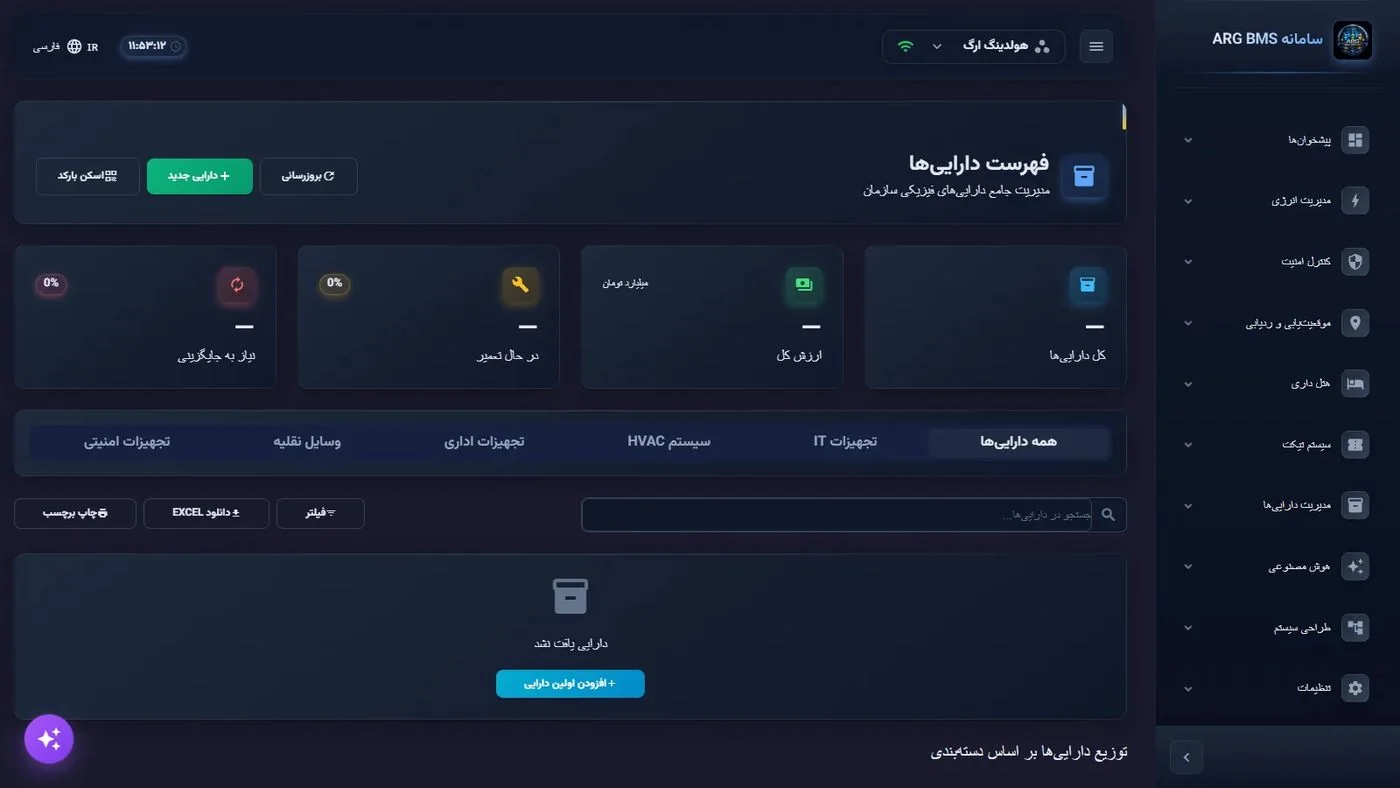
Asset list · Four indicator cards, category tabs, and a toolbar with "Download Excel" and "Print label" - Gauge maintenance discipline. Open برنامه نگهداری (Maintenance schedule) and first look at the عقبافتاده (Overdue) card; if it's above zero it gets an "urgent" chip. Three views are available: نمای لیستی (List view), تقویم (Calendar) and تایملاین (Timeline), and an "upcoming repairs (next 7 days)" section with the technician's name.
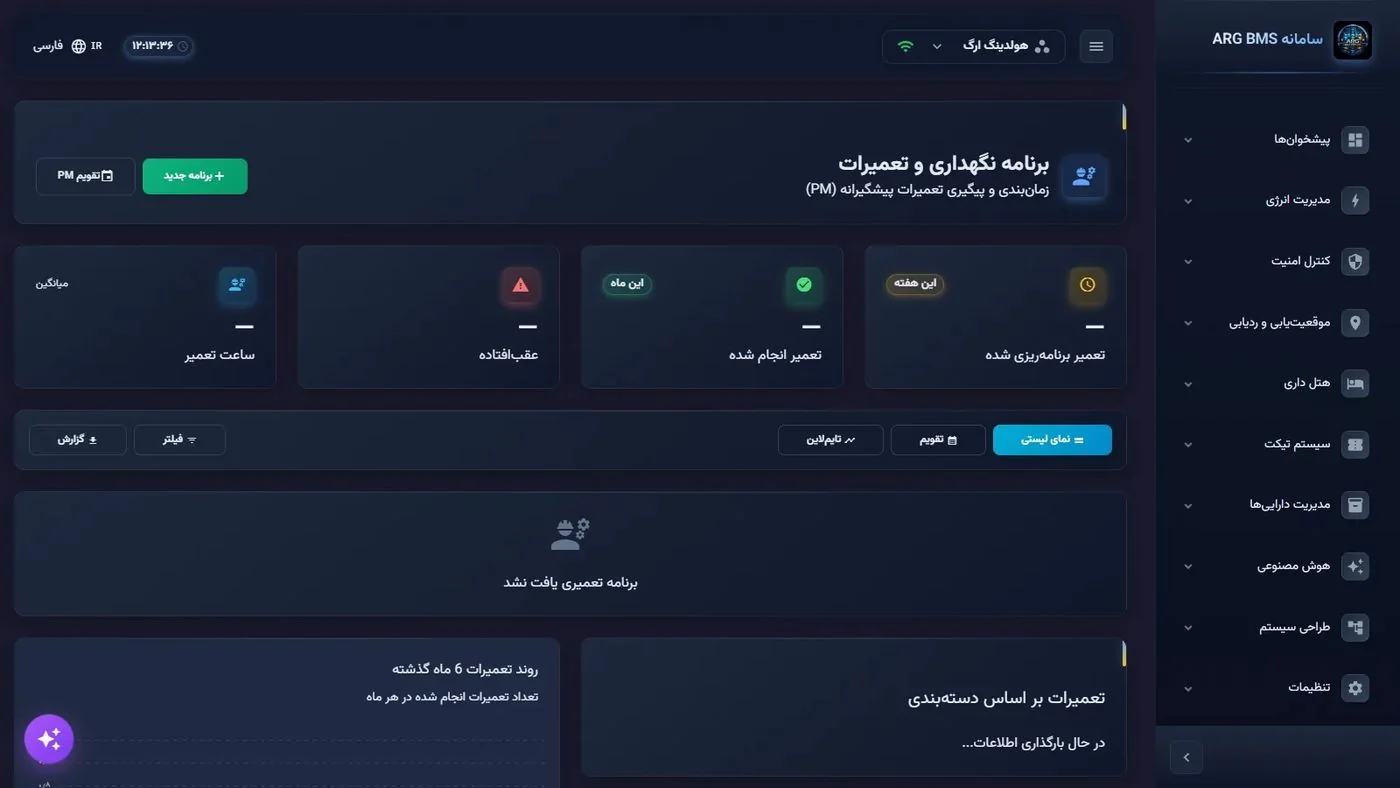
Maintenance and repair schedule · Four indicator cards with "this week" and "this month" chips; three views: list, calendar and timeline Note: In the current version the تقویم and تایملاین views only get selected and don't show separate content; use نمای لیستی to review the schedule. - Learn the maintenance vocabulary. The system recognizes four maintenance types: preventive, corrective, predictive and condition-based; priorities: low, medium, high, critical; statuses: scheduled, pending, in progress, completed, cancelled and overdue. For an executive, the "preventive to corrective" ratio is the best indicator of maintenance maturity.
- Check warranty coverage. اسناد و گارانتی: a document-type filter (گارانتی (Warranty), دفترچه راهنما (Manual), گواهینامه (Certificate), قرارداد (Contract)) and the اسناد در حال انقضا (Documents expiring soon) section for the next 30 days. This page is your early warning for unplanned cost.
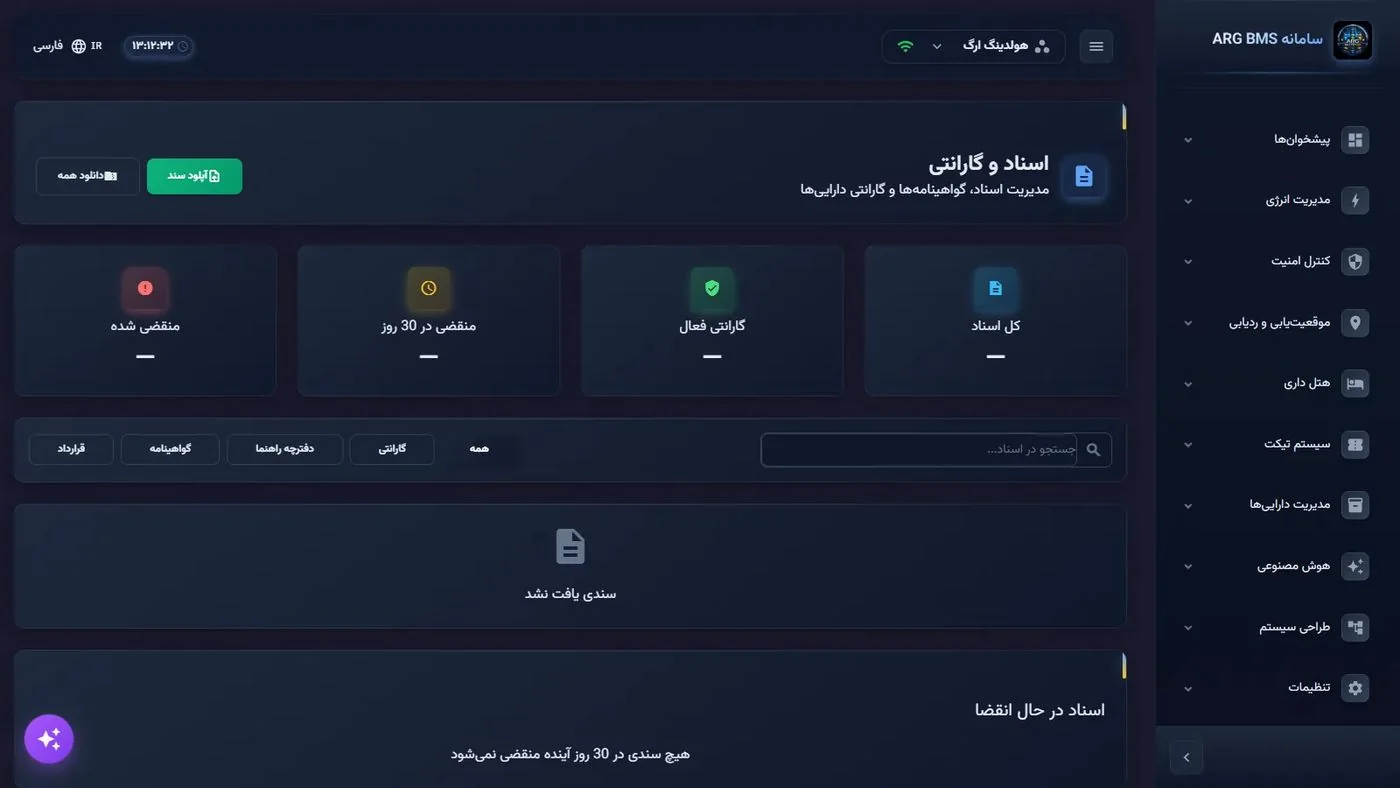
Documents and warranty · Four cards (total documents, active warranty, expiring in 30 days, expired) and a document-type filter - Review lifetime cost. مدیریت هزینه دارایی (Asset cost management) breaks down cost by purchase, maintenance, operation and depreciation, and the تحلیل ROI داراییها (Asset ROI analysis) section rates return on investment and annual savings with an "excellent/good/fair/poor" grade. The table's periods are ماهانه (Monthly), فصلی (Quarterly), سالانه (Yearly).
- Look at ticketing as a preview. «سیستم تیکت» ← «ایجاد تیکت» (Ticketing system ← Create ticket): the اطلاعات تیکت (Ticket information) form with the fields عنوان تیکت (Ticket title), دستهبندی (Category) (IT and computers, facilities, maintenance and repairs, security, administration, other), اولویت (Priority) (default متوسط (Medium)), محل (Location), شرح درخواست (Request description) and پیوستها (Attachments); the side column also has درخواستهای رایج (Common requests) and راهنمای ثبت تیکت (Ticket-submission guide).
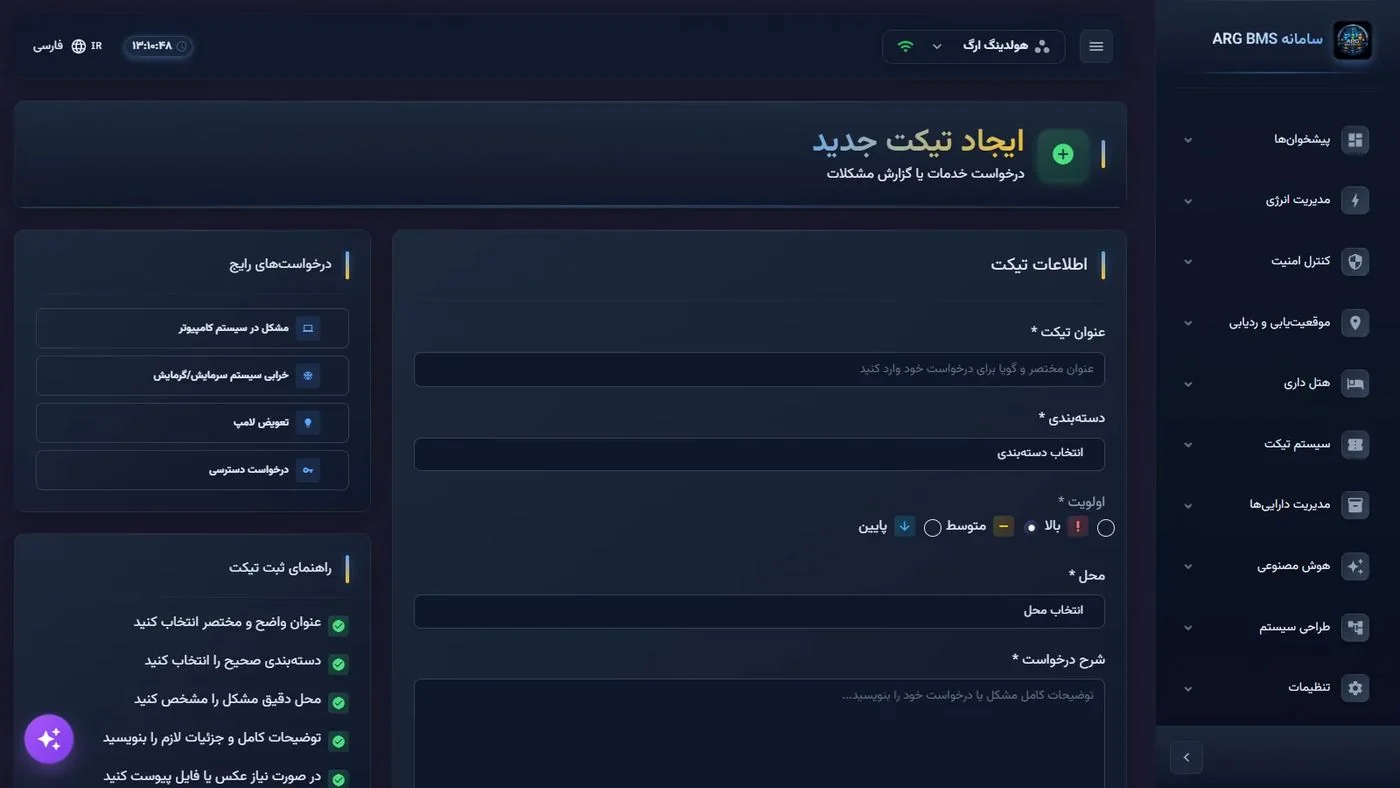
Create new ticket · The ticket-information form with the default priority "Medium" and a list of common requests in the side column - Learn the service-level model. گزارش SLA (SLA report) has four indicators: تحقق SLA (SLA compliance), میانگین زمان پاسخ (Average response time) (under 4 hours is "Excellent", under 6 hours is "Good", more is "Needs improvement"), نرخ FCR (FCR rate) (first-call resolution), and تخطی از SLA (SLA breaches). In the breakdown table, above 90% is also "Excellent" and above 75% is "Good".
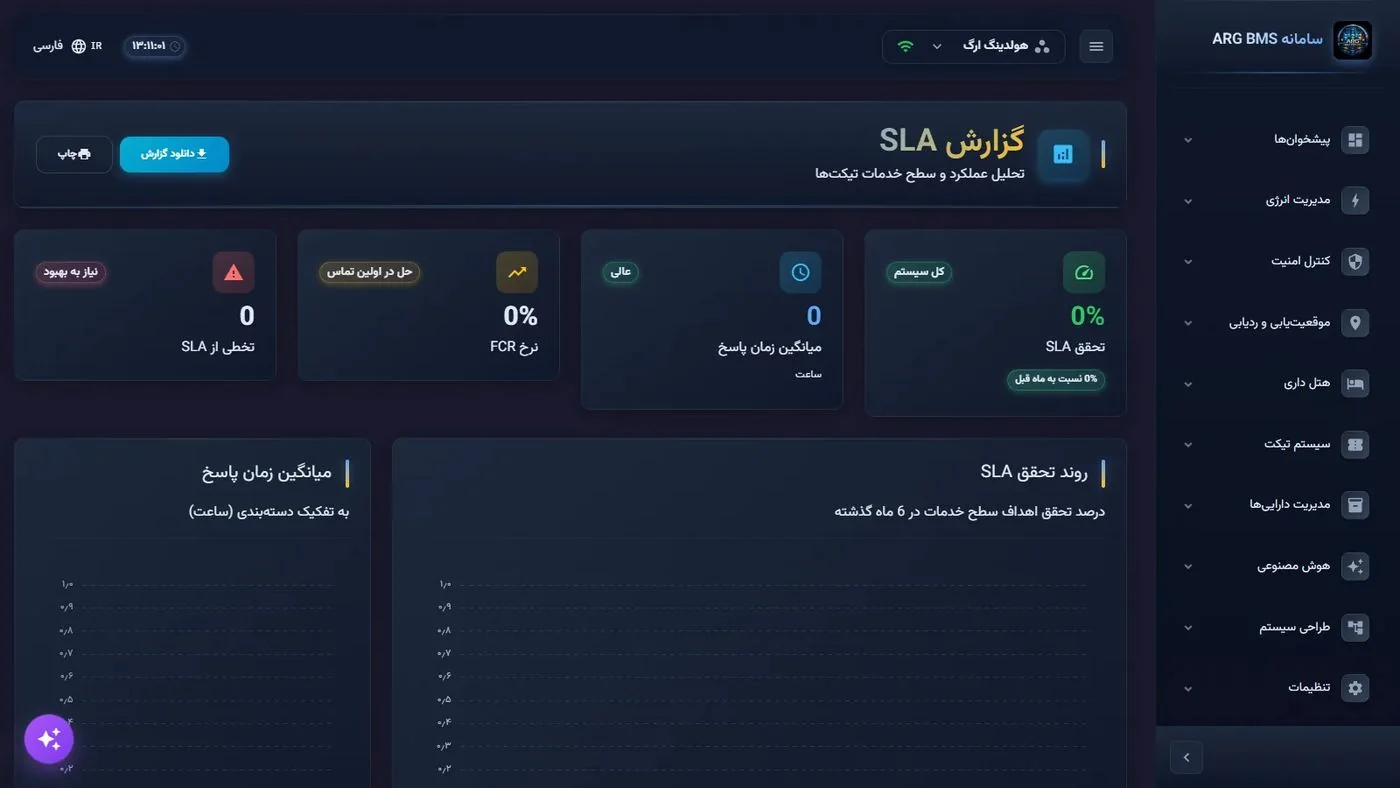
SLA report · Four indicator cards with a status badge, and two trend charts for compliance and response time
Common pitfalls
- The "EXCEL" label on the download button doesn't mean an xlsx file; the output is CSV.
- In the current version, the asset list's text search doesn't narrow the results; use the category tabs to filter.
- Several buttons in these modules (such as دارایی جدید (New asset), چاپ برچسب (Print label), برنامه جدید (New schedule), آپلود سند (Upload document), گزارش مالی (Financial report), and دانلود گزارش (Download report) in the SLA page) don't do anything functional in the current version.
- The table column headers are in English; use the Persian equivalent in a management report so the report isn't bilingual.
- The stars on the ticket form are decorative and no validation is shown; for training users, make a habit of filling in every field completely.
Summary
- Four asset pages: list, maintenance, cost and documents — from portfolio to contractual risk.
- Key management indicators: "Overdue" in maintenance, "Expiring in 30 days" in warranty, and ROI in cost.
- In the current version, the real export comes from "Asset list" (CSV), and the ticketing section is a preview.
- Service-level targets are defined by priority; response-time thresholds: 4 hours "Excellent", 6 hours "Good".
- The ticket form's default priority is "Medium".
Hands-on exercise on the live demo
A "look and interpret" exercise on the public demo. Don't change or delete any existing data; also don't click the ارسال تیکت (Submit ticket) button on the ticket form.
- In فهرست داراییها note the figure on each of the four top cards, and for two category tabs compare the row counts.
- In برنامه نگهداری write down what conclusion you'd draw for the maintenance plan if the عقبافتاده card shows a larger number than "completed repairs".
- In ایجاد تیکت fill in the form for "cooling/heating system failure" at the location "server room" with priority بالا (High), without submitting; then, per the service-level model, write down within what time this ticket's response and resolution should happen.
- In گزارش SLA assume the average response time is 5 hours; determine the status badge and suggest one management action to improve it.
Lesson check
Answer at least 3 of 4 correctly to pass.
- 1. What is the default value of the “Priority” field on the “Create new ticket” form?
- 2. What format does the “Download EXCEL” button in “Asset list” actually produce?
- 3. In the “SLA report”, an average response time of 5 hours is shown with which badge?
- 4. What is the service-level target for a ticket with “High” priority?